GPU-accelerated Spark with NVIDIA RAPIDS v1.7
Integrate NVIDIA RAPIDS with your Spark-connected Postgres Analytics Accelerator (PGAA) environment to achieve hardware-level acceleration for your data lakehouse. While Spark orchestrates distributed workloads across the cluster, RAPIDS offloads intensive computational tasks to the GPU, delivering massive throughput gains for complex queries on large-scale datasets.
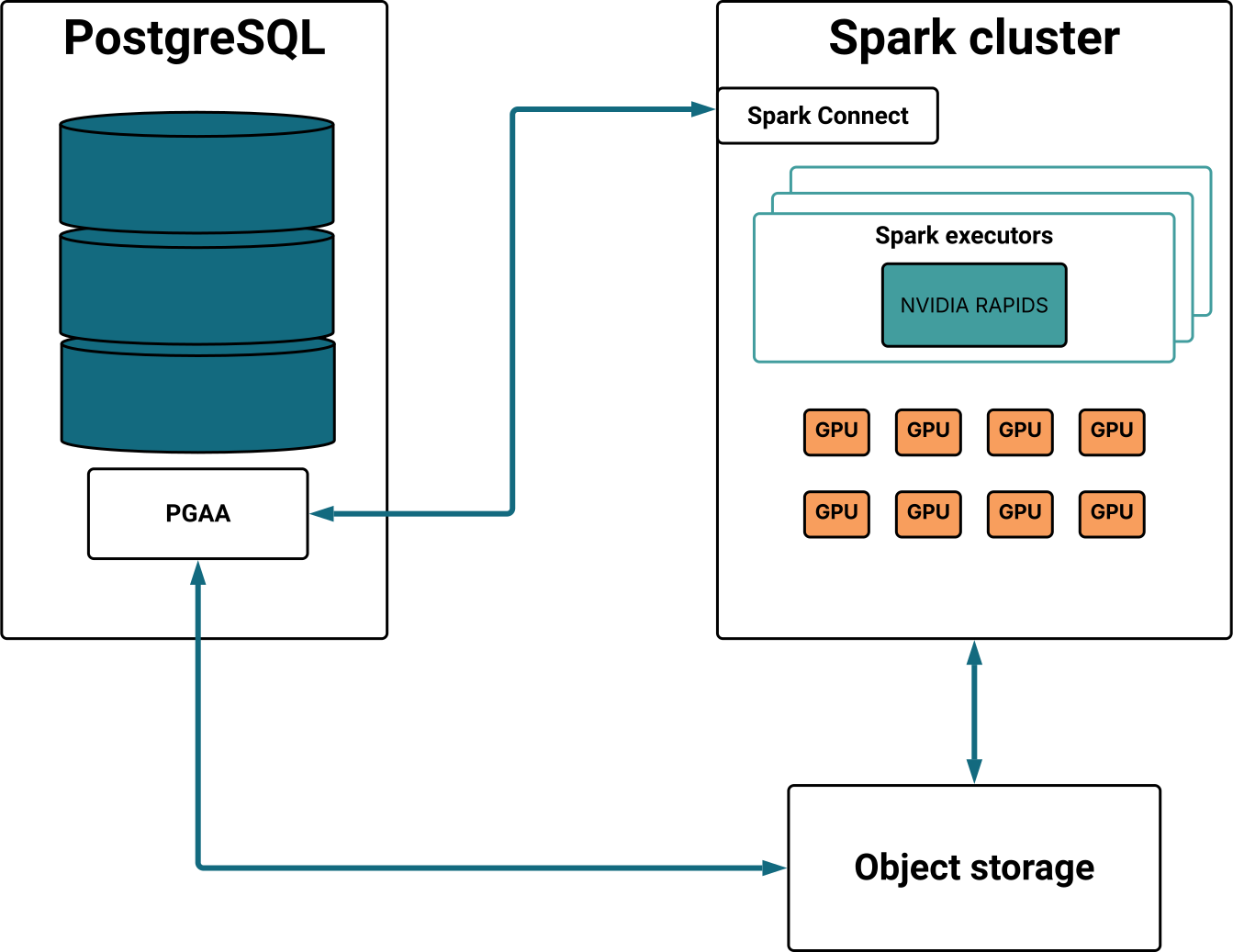
This GPU-accelerated approach allows PGAA to transcend standard distributed processing through the following core capabilities:
- Massively parallel execution: Thousands of NVIDIA GPU cores process columnar data simultaneously, completing complex queries up to 100x faster than standard Postgres tables.
- Hardware-accelerated scaling: While Spark manages distribution at 100 GB, RAPIDS becomes the primary performance driver at 3 TB and beyond, widening the hardware efficiency gap as data grows.
- Zero-overhead performance: Operates directly on columnar data in memory, delivering peak performance without manual indexing, vacuuming, or traditional database tuning.
- Intelligent fallback: Ensures query completion by automatically shifting unsupported operations back to the Spark CPU or the Postgres kernel without user intervention.
Note
Currently, GPU acceleration with Apache Spark is optimized for read-only queries on Parquet files in S3-compatible object storage or a shared POSIX filesystem. Support for Iceberg (read/write) is coming soon.
Configuring GPU acceleration with NVIDIA RAPIDS
The core architecture consists of a Postgres server with the PGAA extension, an Apache Spark cluster configured with NVIDIA RAPIDS, and compatible object storage containing Parquet-formatted data.
To implement this environment, you can leverage existing infrastructure, perform a manual installation, or use our ready-to-run Docker Compose stack to quickly deploy all necessary components. This stack includes pre-configured examples optimized for the NVIDIA Brev platform, allowing you to easily deploy self-serve GPU instances in the cloud. If compatible GPUs are detected, NVIDIA RAPIDS will automatically provide hardware acceleration; otherwise, the system transparently falls back to CPU-based processing.
The configuration of PGAA with NVIDIA RAPIDS consists of the following steps:
- Verify the prerequisites.
- Confirm that NVIDIA RAPIDS is properly installed and active within your Spark cluster.
- Connect Postgres to Spark.
- Configure Postgres's source data.
- Run analytical queries and verify that the workload is utilizing GPU acceleration.
Prerequisites
Postgres: Version 16 or later with PGAA and PGFS extensions installed.
Storage locations: Currently, only S3-compatible storage and local file system are supported as data storage locations.
Apache Spark: Version 3.4 or later.
Spark Connect: A running Spark Connect server configured with the following dependencies:
org.apache.spark:spark-connect_2.12:3.5.6,\
io.delta:delta-spark_2.12:3.3.1,\
org.apache.iceberg:iceberg-spark-runtime-3.5_2.12:1.9.2,\
org.apache.iceberg:iceberg-aws-bundle:1.9.2,\
org.apache.hadoop:hadoop-aws:3.3.4
NVIDIA RAPIDS: Version 2025.10 or above installed on your Spark cluster. See Enabling RAPIDS for details.
Hardware: Access to a machine equipped with NVIDIA GPUs.
Enabling NVIDIA RAPIDS
To utilize GPU acceleration, you must correctly install and activate NVIDIA RAPIDS within your Apache Spark cluster. Configure your Spark environment to support hardware acceleration by following these integration guidelines:
Download RAPIDS JARs: Ensure your Spark environment downloads the necessary RAPIDS JAR files. Specify the plugin version
com.rapids-4-spark_2.12:25.10.0when submitting a job.GPU discovery: Install the GPU discovery script that allows Spark to identify the available GPUs.
Apply Spark configuration: Enable the following parameters as a minimum. For a full list of optimization settings, see the RAPIDS configuration and Tuning guide.
spark.rapids.sql.enabled=true
spark.rapids.filecache.enabled=true
spark.executor.resource.gpu.amount=1
spark.plugins=com.nvidia.spark.SQLPlugin
spark.shuffle.manager=com.nvidia.spark.rapids.spark356.RapidsShuffleManager
Container provisioning: If deploying Spark via Docker, modify your container manifest to grant Spark access to the host GPUs.
For a complete example that implements the above steps—including volume mounting the discovery script, setting environment-level Spark configurations, and configuring the NVIDIA container runtime—refer to our sample docker-compose.yaml.
Connecting Postgres to Spark
From your Postgres's terminal, set PGAA to use Spark as the execution engine and define your Spark Connect endpoint:
SET pgaa.executor_engine = 'spark_connect';
SET pgaa.spark_connect_url = 'sc://spark-connect:15002';
Where
spark-connectpoints to your Spark Connect service address.Confirm that Postgres can communicate with the Spark cluster by executing a simple version check through the PGAA interface:
SELECT pgaa.spark_sql('SELECT version()');
If successful, the command returns the version string of your Spark cluster.
Configuring the source data
Create a PGFS storage location in your Postgres database that points to the bucket containing your analytical data. For example, with a public bucket:
SELECT pgfs.create_storage_location(
'my-sample-data',
's3://beacon-analytics-demo-data-us-east-1-prod',
'{"skip_signature": "true", "region": "us-east-1"}'
);
Create tables using the
PGAAaccess method. Specify the storage location created in the previous step, the path to either a single Parquet file or a directory containing multiple Parquet files, and the format (currently Parquet). For example:CREATE TABLE store () USING PGAA WITH (pgaa.storage_location = 'my-sample-data', pgaa.path = 'tpcds_sf_10/store', pgaa.format = 'parquet'); CREATE TABLE customer () USING PGAA WITH (pgaa.storage_location = 'my-sample-data', pgaa.path = 'tpcds_sf_10/customer', pgaa.format = 'parquet'); CREATE TABLE date_dim () USING PGAA WITH (pgaa.storage_location = 'my-sample-data', pgaa.path = 'tpcds_sf_10/date_dim', pgaa.format = 'parquet'); CREATE TABLE store_returns () USING PGAA WITH (pgaa.storage_location = 'my-sample-data', pgaa.path = 'tpcds_sf_10/store_returns', pgaa.format = 'parquet');
If you specify a directory containing multiple Parquet files, PGAA automatically unions all files into a single table for processing.
Running analytical queries
Run heavy analytical queries against your defined tables to verify that they are successfully leveraging GPU acceleration.
The query is offloaded to the Spark cluster, and if NVIDIA RAPIDS is active, the join and aggregation operations are performed in parallel across thousands of GPU cores.
The following example runs a TPC-DS inspired analytical query that identifies high-return customers by comparing their total store returns against the regional average. This involves complex Common Table Expressions (CTEs), correlated subqueries, and multi-stage aggregations—precisely the type of CPU-intensive workload that PGAA accelerates through vectorized execution:
WITH customer_total_return AS (
    SELECT
        sr_customer_sk AS ctr_customer_sk,
        sr_store_sk AS ctr_store_sk,
        SUM(sr_return_amt) AS ctr_total_return
    FROM store_returns, date_dim
    WHERE sr_returned_date_sk = d_date_sk
      AND d_year = 2000
    GROUP BY sr_customer_sk, sr_store_sk
)
SELECT c_customer_id
FROM customer_total_return ctr1, store, customer
WHERE ctr1.ctr_total_return > (
    SELECT AVG(ctr_total_return) * 1.2
    FROM customer_total_return ctr2
    WHERE ctr1.ctr_store_sk = ctr2.ctr_store_sk
)
AND s_store_sk = ctr1.ctr_store_sk
AND s_state = 'TN'
AND ctr1.ctr_customer_sk = c_customer_sk
ORDER BY c_customer_id
LIMIT 100;
To confirm that NVIDIA RAPIDS is actively accelerating your queries, monitor the execution plan through the Spark Connect UI:
- Access the Spark UI at
http://<spark_driver_host>:4040. - Navigate to the SQL tab and select your recently executed query.
- Inspect the plan. If RAPIDS is active, the query nodes will be prefixed with Gpu. For example,
GpuFilter,GpuBatchScan,GpuUnion, etcetera.
Beyond the query plan, you can analyze GPU-specific performance metrics directly within the Spark UI to identify potential bottlenecks. For a detailed breakdown of these metrics and how to optimize them, refer to the NVIDIA tuning guide.