Hybrid Manager (HM) offers a dual release strategy: Long-Term Support (LTS) Releases and Innovation Releases (IR). Because these streams follow different versioning logic, the supported paths for moving among them depend on your current version and the target environment.
Tip
If you want to upgrade your Postgres database clusters instead, see Upgrading database clusters in Hybrid Manager.
Release types
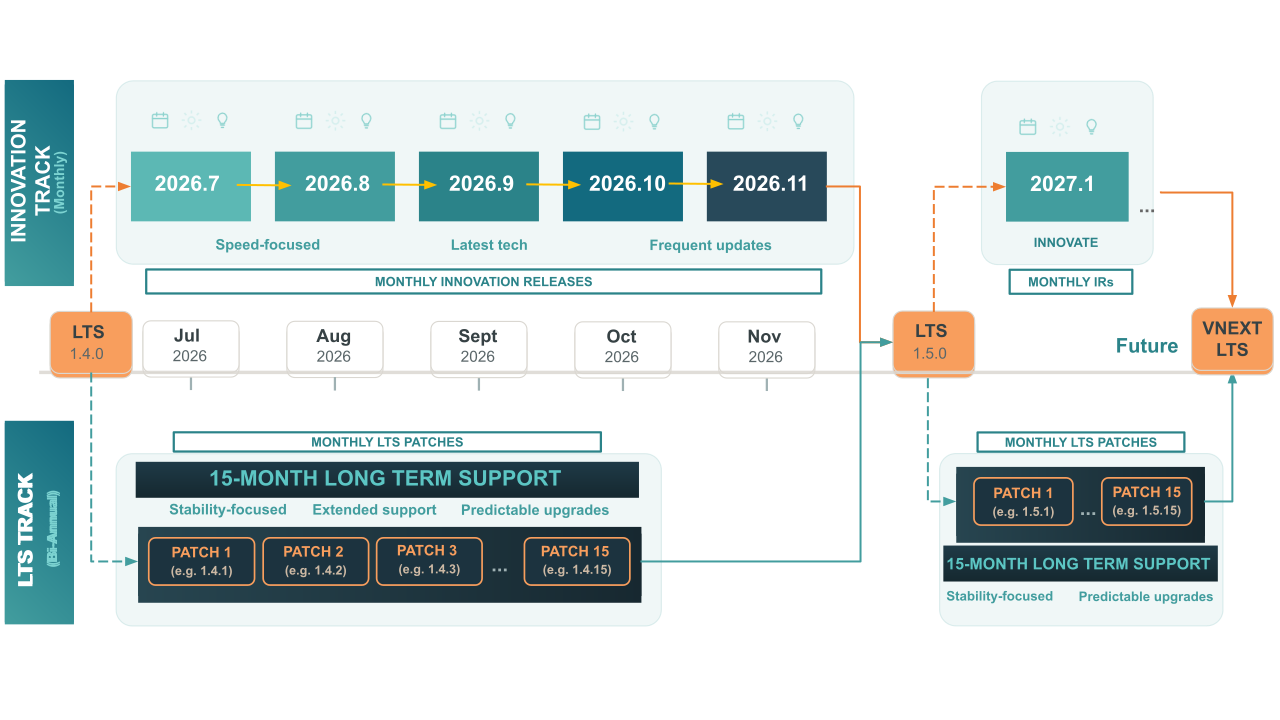
Innovation Releases (IR) are delivered monthly. They focus on continuous platform hardening, workflow improvements, stability, reliability, and introduce smaller, iterative new features. They are ideal for customers and teams that want early access to the latest capabilities and want to follow the leading edge of product development.
Long-Term Support (LTS) releases are delivered twice a year. They consolidate the innovations from preceding monthly releases into a stable, well-tested foundation suited to production deployments that require predictability and an extended support window. Each LTS release is supported for 15 months from its release date, with monthly patch releases throughout that period delivering bug fixes and security updates.
| LTS | Innovation Release (IR) | |
|---|---|---|
| Version format | Semantic versioning (for example, 1.x.x) | Calendar-based (for example, 2026.x) |
| Release cadence | Bi-annual | Monthly |
| Patches | Monthly patch releases with bug and security fixes | No planned patches—replaced by the next monthly release. Critical fixes, such as CVEs, may result in an unplanned patch. |
| Upgrade path | One minor version at a time (for example, 1.3.x → 1.4.y); skipping minor versions not supported | Sequential month-to-month upgrades required |
| Best for | Production environments requiring stability and extended support | Development, testing, or teams wanting leading-edge features |
Important
For current support timelines and end-of-support dates, see Platform Compatibility.
IR upgrade paths
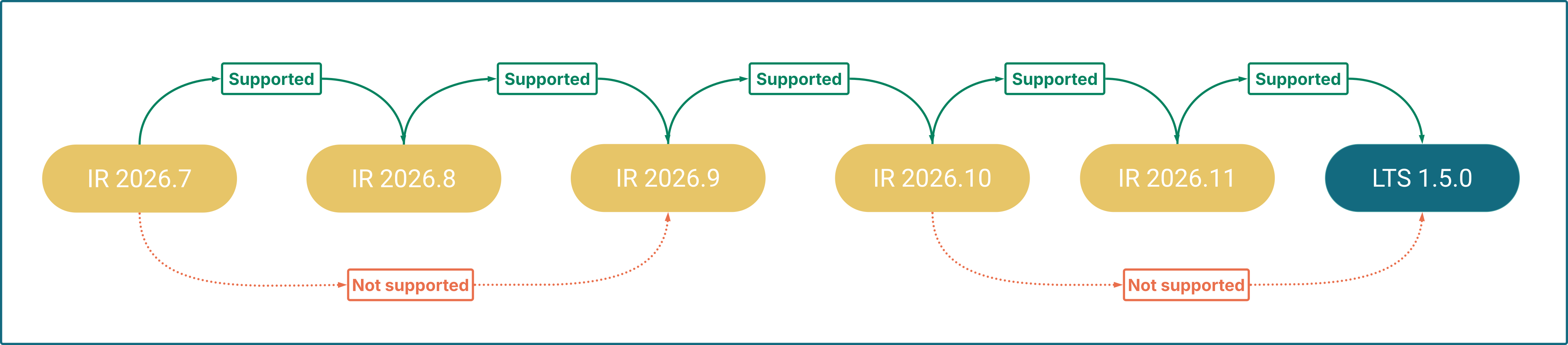
You must upgrade month-to-month within the IR stream (for example, 2025.10 → 2025.11). Each IR cycle runs until a consolidation point, where a new LTS version is released. To continue receiving updates after a consolidation point, you must transition to the newly released LTS version (for example, 1.5.0), which then serves as the foundation for the next IR cycle.
LTS upgrade paths
LTS releases follow standard semantic versioning (major.minor.patch, for example, 1.4.x). These versions focus on stability, receiving monthly patch releases with bug and security fixes for their full support lifespan.
Minor and patch version upgrades
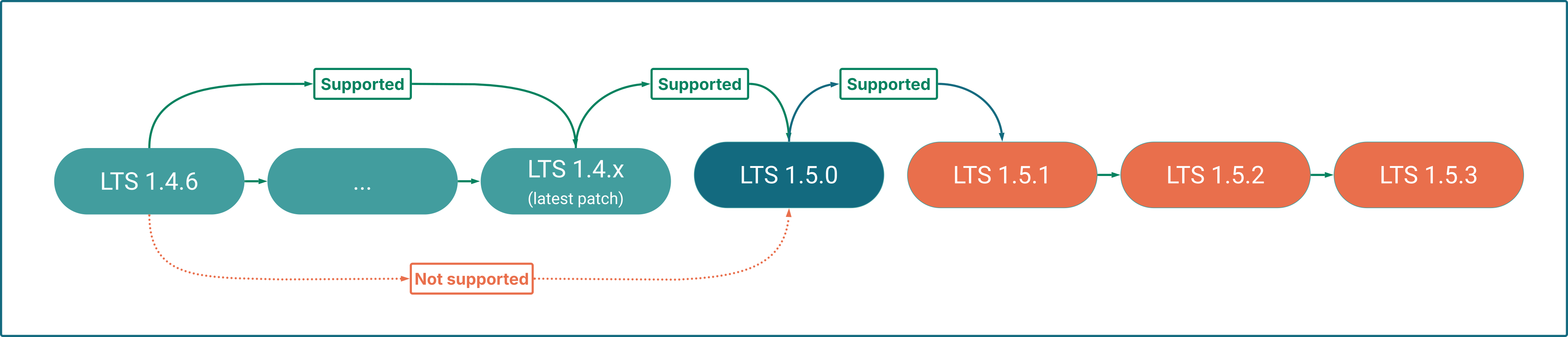
To upgrade to the next minor version (for example, 1.3.latest to 1.4.0), you must be on the latest available patch of your current minor version first.
Within the same minor version, patch upgrades are flexible: you may upgrade from any patch to any higher patch (for example, 1.3.1 to 1.3.5) without installing intermediate patches.
Major version upgrades
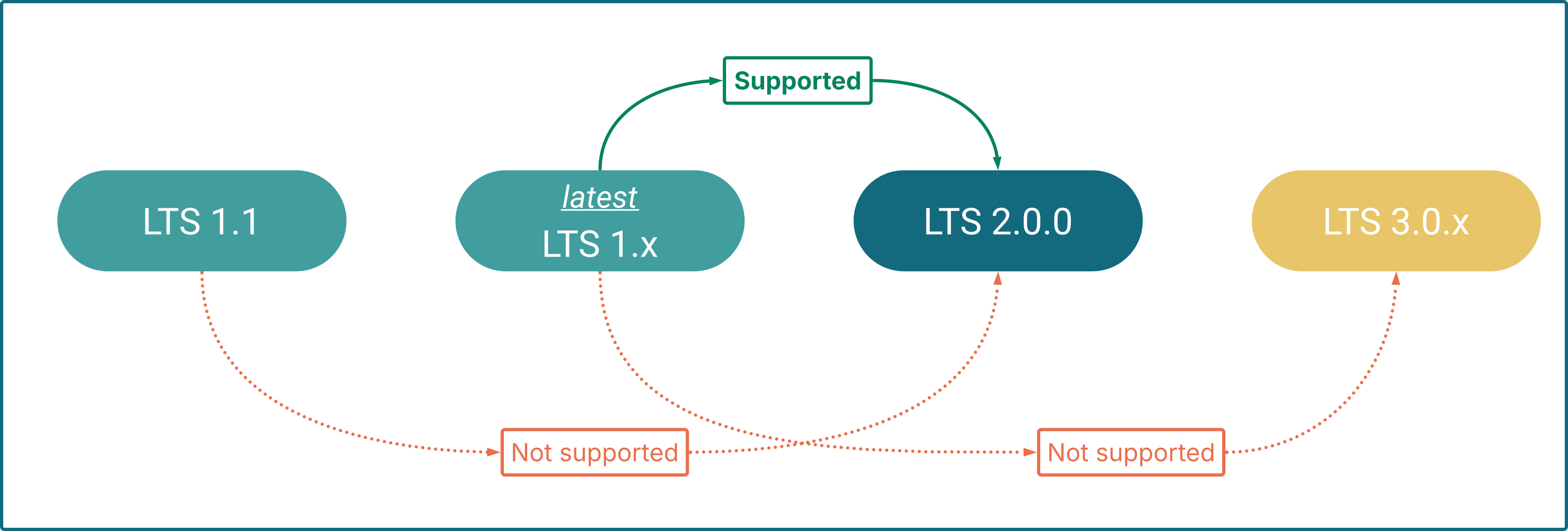
When a new major version (for example, 2.0) is released, you must be running the latest available minor and patch release of the 1.latest.latest stream to perform the upgrade.
Cross-stream upgrade paths
Moving between LTS and Innovation Releases is possible but has specific constraints.
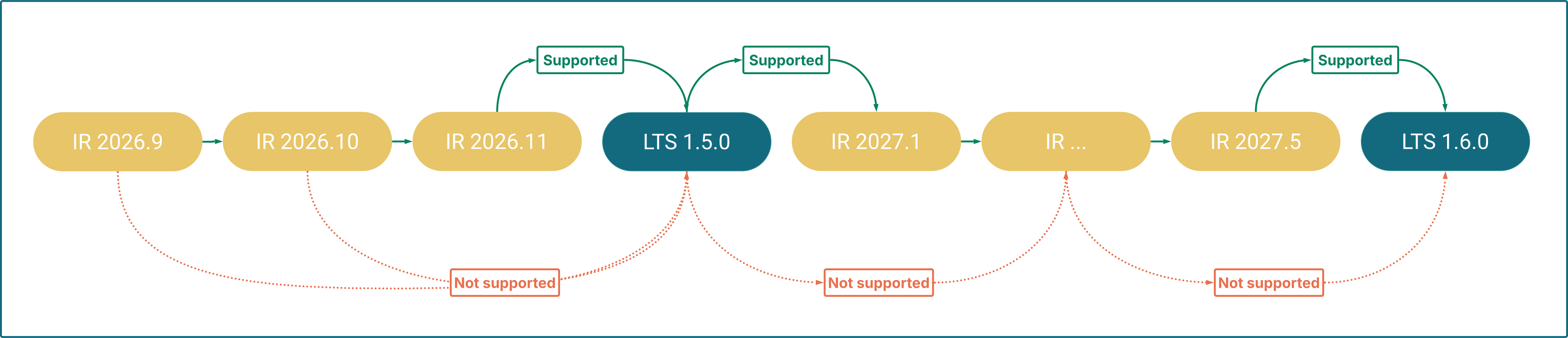
Innovation Release to LTS
You can move from the final Innovation Release of a cycle to the LTS release that consolidates those features, but not from any other IR in the cycle.
To determine if your current IR supports transitioning to LTS, check the upgrade instructions for that specific version—they indicate whether the transition is supported.
LTS to Innovation Release
You can upgrade an LTS release to its immediate succeeding Innovation Release. You can't jump to an arbitrary or later IR—upgrade to the immediate successor first, then follow the sequential IR upgrade path.
Warning
Once you move from an LTS release to an Innovation Release, you can't return to LTS until the next consolidation point (see Innovation Release to LTS above). Consolidation points occur twice a year.
Service availability during upgrades
Some upgrades may trigger an automatic restart of your HM-managed Postgres database clusters. To avoid unexpected interruptions, check the service availability notes in the specific upgrade guide you are following.
Scenario changes on upgrade
Several installation scenarios change across Innovation Releases 2026.8 and 2026.9. Check your HybridControlPlane manifest against the ones that apply to your upgrade path.
The marketplace scenario
marketplace is a separate scenario from core and consists of the kapp package manager and the OSS Library apps it deploys, such as Superset, Airflow, and pgAdmin.
- If your
HybridControlPlanespec already includes theaiscenario,marketplaceis added automatically during the upgrade. No action is required. - If your spec lists only
core(withoutai) and you use the OSS Library/marketplace apps, you must explicitly addmarketplaceto yourspec.scenarioslist. Do this before upgrading to Innovation Release 2026.8 or later:
spec:
  scenarios:
    - core
    - marketplace
    - <other_scenarios>
Important
If you don't add marketplace to your scenario list, kapp-controller and the marketplace apps are removed as no longer part of your selected scenarios, along with the data those apps hold.
The dbaas scenario
dbaas isn't new, but its contents changed in Innovation Release 2026.8. In 2026.7, upm-api-gucs and pg4k-additional-controllers belonged to core. From 2026.8, they belong to dbaas instead.
A 2026.7 installation that pins spec.scenarios to core is already running both components. After the move, they fall outside every scenario that installation selects, and the upgrade removes them.
- If your spec lists scenarios explicitly, add
dbaasbefore you upgrade:
spec:
  scenarios:
    - core
    - dbaas
    - <other_scenarios>
- If you omit
spec.scenariosentirely, the set that applies depends both on your operator version and on what is already stored on the resource. Operator 2.1 fills an empty list withcore,dbaas,ai,analytics,migration, andmarketplace; operator 2.2 or later fills it withcorealone. Rather than reasoning about the default, read the stored list back:
kubectl get hybridcontrolplane <name> -o jsonpath='{.spec.scenarios}'
Add dbaas explicitly if it isn't there.
Important
Nothing adds dbaas for you automatically. It depends only on core, unlike ai, which pulls in marketplace as a dependency. Every installation that lists scenarios without dbaas has to add it by hand.
The pgd scenario
From Innovation Release 2026.9 onwards, pgd — which provisions and manages Distributed High Availability (DHA) clusters — is controlled by its own installation scenario, separated from dbaas.
If you use DHA clusters, you must explicitly add pgd to your spec.scenarios list before upgrading to Innovation Release 2026.9 (even for secondary locations).
Important
Add pgd to every location that hosts, or will host, DHA clusters — including secondary locations. If you don't add pgd to a location's scenario list, its existing DHA clusters will be deleted (and new ones will not be allowed to be created).
Upgrading multi-DC deployments
In a multi-DC deployment, all locations must run the same HM version. The Beacon server on the primary and the Beacon agents on the secondaries must run the same version to communicate reliably and provide full feature functionality.
When upgrading a multi-DC deployment, upgrade the primary location first, then upgrade each data-only secondary location to the same version immediately after. For the full procedure, see Upgrading a multi-DC deployment.
Operator on Red Hat OpenShift
Upgrade the EDB Postgres AI operator on Red Hat OpenShift by switching the OperatorHub subscription to the stable channel.
2026.9 to 2026.10.1
Follow the step-by-step procedures for upgrading from HM 2026.9 to HM 2026.10.1.
2026.8 to 2026.9
Follow the step-by-step procedures for upgrading from HM 2026.8 to HM 2026.9.
2026.7 to 2026.8
Follow the step-by-step procedures for upgrading from HM 2026.7 to HM 2026.8.
1.4.x to 2026.7
Follow the step-by-step procedures for upgrading from HM 1.4.x to HM 2026.7.
1.3.x to 1.4.0
Follow the step-by-step procedures for upgrading from the latest HM 1.3.x patch to HM 1.4.0.
2026.5.1 to 1.4.0
Follow the step-by-step procedures for upgrading from HM 2026.5.1 to HM 1.4.0.
2026.4 to 2026.5.1
Follow the step-by-step procedures for upgrading from HM 2026.4 to HM 2026.5.1.
2026.3 to 2026.4
Follow the step-by-step procedures for upgrading from HM 2026.3 to HM 2026.4.
2026.2 to 2026.3
Follow the step-by-step procedures for upgrading from HM 2026.2 to HM 2026.3.
2026.1 to 2026.2
Follow the step-by-step procedures for upgrading from HM 2026.1 to HM 2026.2.
2025.12 to 2026.1
Follow the step-by-step procedures for upgrading from HM 2025.12 to HM 2026.1.
2025.11 to 2025.12
Follow the step-by-step procedures for upgrading from HM 2025.11 to HM 2025.12.
1.3.x to 2025.12
Follow the step-by-step procedures for upgrading from HM 1.3.x to HM 2025.12.
1.4.0 to 1.4.1
Follow the step-by-step procedures for upgrading from HM 1.4.0 to HM 1.4.1.