Connectivity v2.0.0
Information about secure network communications in a PGD cluster includes:
- Services
- Domain names resolution using fully qualified domain names (FQDN)
- TLS configuration
- Connecting from an application
Note
Although these topics might seem unrelated to each other, they all participate in the configuration of the PGD resources to make them universally identifiable and accessible over a secure network.
Services
Resources in a PGD cluster are accessible through Kubernetes services. Each PGD group manages several key services:
- A node service for each node, used for internal communications.
- A group service that allows EDB Postgres® AI for CloudNativePG™ Global Cluster to discover and connect to any node within the group.
- A proxy service that enables applications to transparently access the group’s write leader via the read-write port of the PGD Connection Manager for write operations.
- A proxy-r service that enables applications to transparently access the group’s read nodes via the read-only port of the PGD Connection Manager for read operations.
Note
The term read nodes refers to nodes that are not currently designated as the write leader. In a PGD group,
all nodes are capable of handling writes, but the write leader is the elected node that processes writes through
the proxy service. The read nodes accessed via the proxy-r service are also writable, but the read-only port provided
by the connection manager restricts those connections to read-only operations, similar to using SET TRANSACTION READ ONLY.
For more details, see Read-only connections.
For an example that uses these services, see Connecting an application to a PGD cluster.
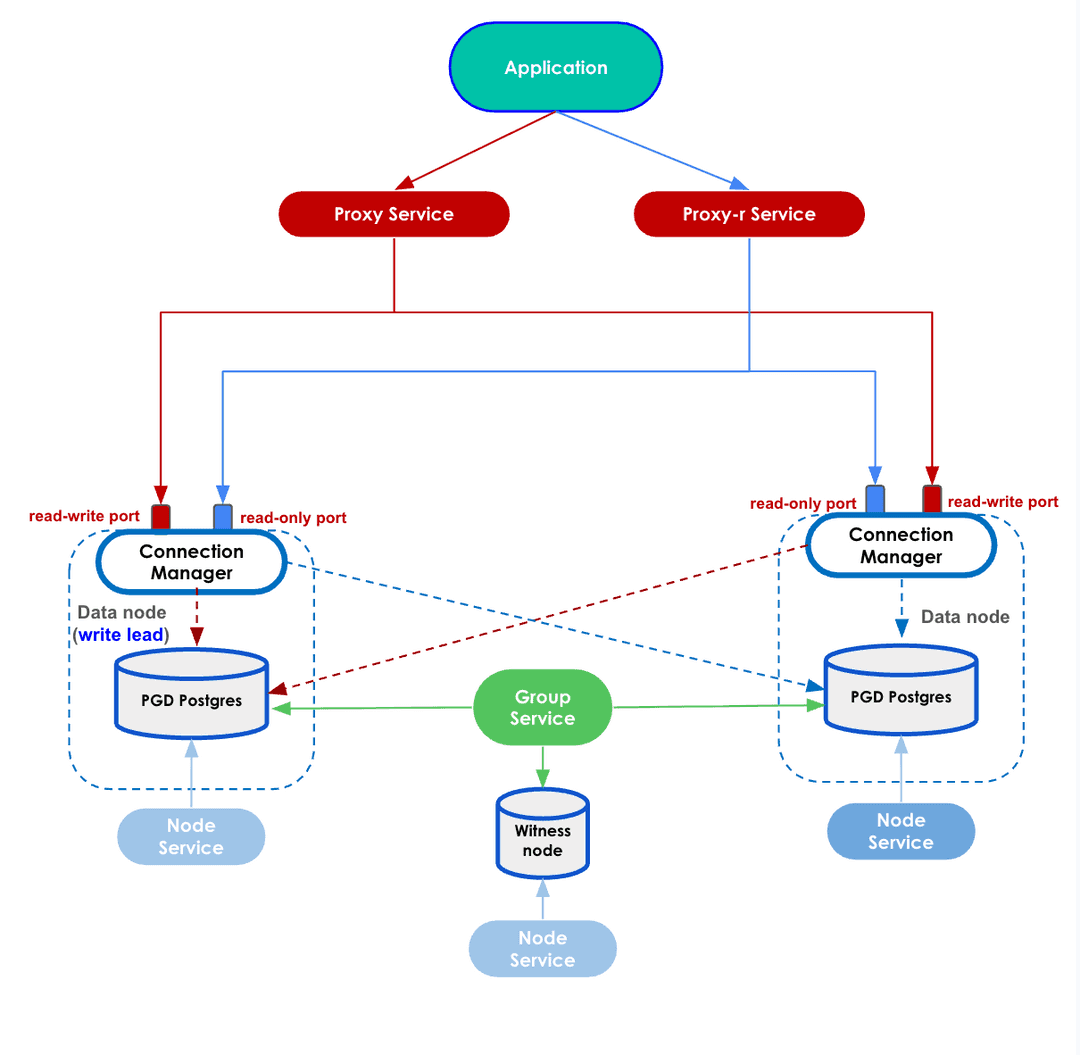
Each service is generated from a customizable template in the .spec.connectivity
section of the manifest.
All services must be reachable using their FQDN from all the PGD nodes in all the Kubernetes clusters. See Domain names resolution.
EDB CloudNativePG Global Cluster provides a service templating framework that gives you the availability to easily customize services at the following levels:
Node Service Template : Each PGD node is reachable using a service that can be configured in the
.spec.connectivity.nodeServiceTemplatesection. You can leverage the variables{node_svc}and{node_fqdn}to substitute for the node service name and the node service's FQDN.Group Service Template : Each PGD group has a group service that's a single entry point for the whole group and that can be configured in the
.spec.connectivity.groupServiceTemplatesection. You can leverage the variables{group_svc}and{group_fqdn}to substitute for the group service name and the group service's FQDN.Proxy Service Template : Each PGD group has a proxy service to reach the group write leader through the PGD proxy. It can be configured in the
.spec.connectivity.proxyServiceTemplatesection. This is the entry-point service for applications. You can leverage the variables{proxy_svc}and{proxy_fqdn}to substitute for the proxy service name and the proxy service's FQDN.Proxy Read Service Template : Each PGD group has a proxy service to reach the group read nodes through the PGD proxy. It can be enabled with
.spec.proxySettings.enableReadNodeRouting, and can be configured in the.spec.connectivity.proxyReadServiceTemplatesection. This is the entry-point service for applications. You can leverage the variables{proxy_svc}and{proxy_fqdn}to substitute for the proxy service name and the proxy service's FQDN.
You can use templates to create a LoadBalancer service or to add arbitrary annotations and labels to a service to integrate with other components available in the Kubernetes system (that is, to create external DNS names or tweak the generated load balancer).
Here is an example of a proxy service template, which creates a LoadBalancer proxy service. Once the
service is created, {proxy_svc} will be replaced with the proxy service name, and {proxy_fqdn} will
be replaced with the proxy service's FQDN.
spec:
  connectivity:
    ...
    proxyServiceTemplate:
      metadata:
        annotations:
          proxy_service_name: '{proxy_svc}'
          proxy_service_fqdn: '{proxy_fqdn}'
      spec:
        loadBalancerSourceRanges:
        - 0.0.0.0/0
        ports:
        - name: postgres
          port: 5432
          protocol: TCP
          targetPort: 6432
        type: LoadBalancer
      updateStrategy: patch
Domain names resolution
EDB CloudNativePG Global Cluster ensures that all resources in a PGD group have a FQDN, and by convention uses the PGD group name as a prefix for all of them.
As a result, it expects you to define the domain name of the PGD group. This
can be done through the .spec.connectivity.dns section, which controls how the
FQDNs for the resources are generated with two fields:
domain— Domain name for all the objects in the PGD group to use (mandatory).hostSuffix— Suffix to add to each service in the PGD group (optional).
You can also define a list of additional domain and hostSuffix in
.spec.connectivity.dns.additional. Make sure that these additional domain
and hostSuffix entries match with the rendered nodeServiceTemplate and groupServiceTemplate.
Node Services and Group Services with additional domain and hostSuffix entries will be included
in the Subject Alternative Name of the service certificate.
TLS configuration
EDB CloudNativePG Global Cluster requires that resources in a PGD cluster communicate over a secure connection. It relies on PostgreSQL's native support for SSL connections to encrypt client/server communications using TLS protocols for increased security.
Currently, EDB CloudNativePG Global Cluster requires that cert-manager is installed. Cert-manager was chosen as the tool to provision dynamic certificates given that it's widely recognized as the standard in a Kubernetes environment.
The spec.connectivity.tls section describes how the communication between the
nodes happens. Please refer to the certificates section for
more details on how TLS is configured.
Connecting from an application
Connecting to a PGD Group from an application running inside the same Kubernetes cluster
or from outside the cluster is a simple procedure. In both cases, you connect to
the proxy service of the PGD Group as the app user. The proxy service is a LoadBalancer
service that routes the connection to the write leader or read nodes of the PGD Group,
depending on which proxy service it's connecting to.
Connecting from inside the cluster
When connecting from inside the cluster, you can use the proxy service name to connect
to the PGD group. The proxy service name is composed of the PGD group name plus -proxy, and
the optional host suffix defined in the .spec.connectivity.dns section of the PGDGroup
custom resource.
For example, if the PGD group name is my-group, and the host suffix is .my-domain.com,
the proxy service name is my-group-proxy.my-domain.com.
Before connecting, you need to get the password for the app user from the app user
secret. The app user name is defined by spec.pgd.ownerName, and the app user secret is
defined by spec.pgd.ownerCredentialsSecret.
You can get the username and password from the secret using the following commands:
kubectl get secret <app user secret> -o jsonpath='{.data.username}' | base64 --decode
kubectl get secret <app user secret> -o jsonpath='{.data.password}' | base64 --decode
With this, you have all the pieces for a connection string to the PGD group:
postgresql://<app-user>:<app-password>@<proxy-service-name>:5432/<database>
Or, for a psql invocation:
psql -U <app-user> -h <proxy-service-name> <database>
Where app-user and app-password are the values you got from the secret,
and database is the name of the database you want to connect
to, defined by spec.pgd.databaseName. (The default is app for the app user.)
Connecting from outside the Kubernetes cluster
When connecting from outside the Kubernetes cluster, in the general case, the Ingress resource or a load balancer is necessary. Check your cloud provider or local installation for more information about their behavior in your environment.
Ingresses and load balancers require a pod selector to forward connection to the connection manager running in the data node. When configuring them, we suggest using the following labels:
k8s.pgd.enterprisedb.io/group— Set the PGD group name.k8s.pgd.enterprisedb.io/workloadType— Set topgd-node-data.
If using Kind or other solutions for local development, the easiest way to access the PGD group from outside is to use port forwarding to the proxy service. You can use the following command to forward port 5432 on your local machine to the proxy service:
kubectl port-forward svc/my-group-proxy.my-domain.com 5432:5432Where my-group-proxy.my-domain.com is the proxy service name from the previous example.