Connection pooling v1.28.0-rc1
EDB Postgres® AI for CloudNativePG™ Cluster provides native support for connection pooling with
PgBouncer, one of the most popular open source
connection poolers for PostgreSQL, through the Pooler custom resource definition (CRD).
In brief, a pooler in EDB Postgres® AI for CloudNativePG™ Cluster is a deployment of PgBouncer pods that sits
between your applications and a PostgreSQL service, for example, the rw
service. It creates a separate, scalable, configurable, and highly available
database access layer.
Warning
EDB Postgres® AI for CloudNativePG™ Cluster requires the auth_dbname feature in PgBouncer.
Make sure to use a PgBouncer container image version 1.19 or higher.
Architecture
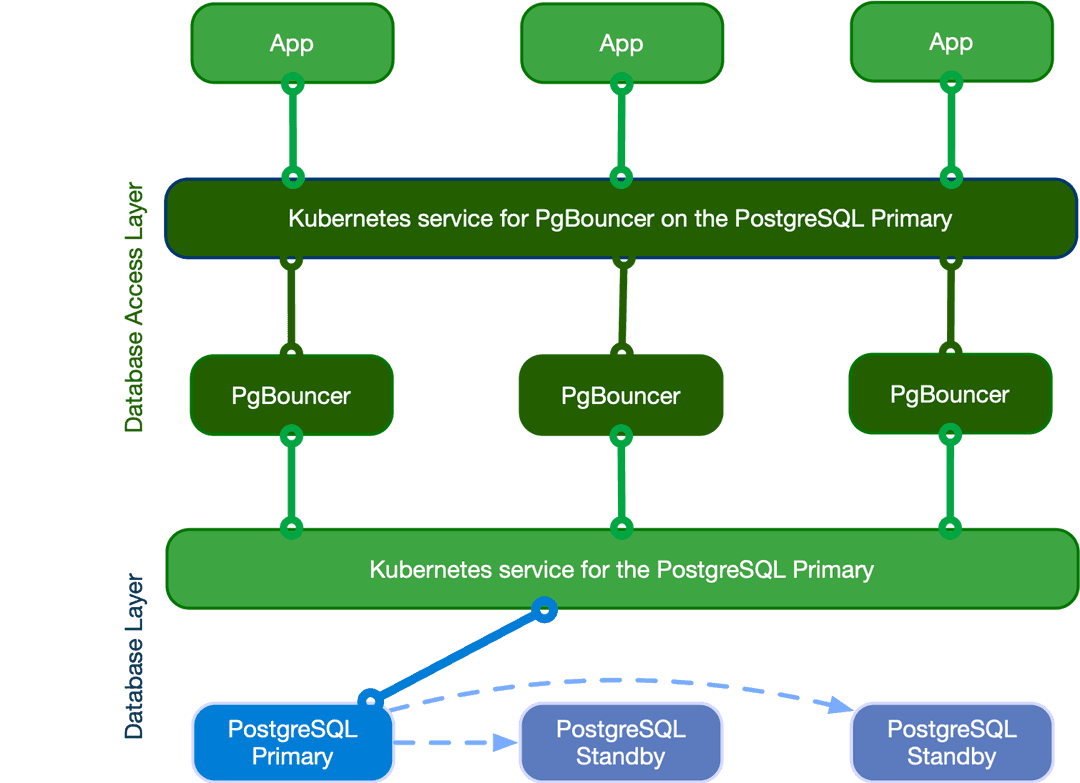
The following diagram highlights how introducing a database access layer based on PgBouncer changes the architecture of EDB Postgres® AI for CloudNativePG™ Cluster. Instead of directly connecting to the PostgreSQL primary service, applications can connect to the equivalent service for PgBouncer. This ability enables reuse of existing connections for faster performance and better resource management on the PostgreSQL side.
Quick start
This example helps to show how EDB Postgres® AI for CloudNativePG™ Cluster implements a PgBouncer pooler:
apiVersion: postgresql.k8s.enterprisedb.io/v1
kind: Pooler
metadata:
  name: pooler-example-rw
spec:
  cluster:
    name: cluster-example

  instances: 3
  type: rw
  pgbouncer:
    poolMode: session
    parameters:
      max_client_conn: "1000"
      default_pool_size: "10"
Important
The pooler name can't be the same as any cluster name in the same namespace.
This example creates a Pooler resource called pooler-example-rw
that's strictly associated with the Postgres Cluster resource called
cluster-example. It points to the primary, identified by the read/write
service (rw, therefore cluster-example-rw).
The Pooler resource must live in the same namespace as the Postgres cluster.
It consists of a Kubernetes deployment of 3 pods running the
latest stable image of PgBouncer,
configured with the session pooling mode
and accepting up to 1000 connections each. The default pool size is 10
user/database pairs toward PostgreSQL.
Important
The Pooler resource sets only the * fallback database in PgBouncer. This setting means that
that all parameters in the connection strings passed from the client are
relayed to the PostgreSQL server. For details, see "Section [databases]"
in the PgBouncer documentation.
EDB Postgres® AI for CloudNativePG™ Cluster also creates a secret with the same name as the pooler containing the configuration files used with PgBouncer.
API reference
For details, see PgBouncerSpec
in the API reference.
Pooler resource lifecycle
Pooler resources are not managed automatically by the operator. You create
them manually when needed, and you can deploy multiple poolers for the same
PostgreSQL cluster.
The key point to understand is that the lifecycles of the Cluster and
Pooler resources are independent. Deleting a cluster does not automatically
remove its poolers, and deleting a pooler does not affect the cluster.
Info
Once you are familiar with how poolers work, you have complete flexibility in designing your architecture. You can run clusters without poolers, clusters with a single pooler, or clusters with multiple poolers (for example, one per application).
Important
When the operator itself is upgraded, pooler pods will also undergo a rolling upgrade. This ensures that the instance manager inside the pooler pods is upgraded consistently.
Security
Any PgBouncer pooler is transparently integrated with EDB Postgres® AI for CloudNativePG™ Cluster support for in-transit encryption by way of TLS connections, both on the client (application) and server (PostgreSQL) side of the pool.
Containers run as the pgbouncer system user, and access to the pgbouncer
administration database is allowed only by way of local connections, through
peer authentication.
Certificates
By default, a PgBouncer pooler reuses the same certificates as the PostgreSQL
cluster. It relies on TLS client certificate authentication to connect to the
PostgreSQL server and run the auth_query used for client password
authentication (see "Authentication").
Supplying your own secrets disables the built-in integration. From that point, you gain complete control (and responsibility) for managing authentication. Supported secret formats are:
- Basic Auth
- TLS
- Opaque
For Opaque secrets, the Pooler resource expects the following keys:
tls.crttls.key
In practice, this means you can treat an Opaque secret as a TLS secret, starting from the same structure.
Authentication
Default authentication method
By default, EDB Postgres® AI for CloudNativePG™ Cluster natively supports password-based authentication for PgBouncer clients connecting to the PostgreSQL database.
This built-in mechanism leverages PgBouncer’s auth_dbname (introduced in
version 1.19), together with the auth_user and auth_query options.
Important
If you provide your own certificate secrets, the built-in integration is disabled. In that case, you are fully responsible for configuring and managing PgBouncer authentication.
The built-in integration performs the following tasks:
- Creates a dedicated user called
cnp_pooler_pgbouncerin the PostgreSQL server - Creates the lookup function in the
postgresdatabase and grants execution privileges tocnp_pooler_pgbouncer(following PoLA principles) - Issues a TLS certificate for this user
- Configures PgBouncer to use
cnp_pooler_pgbounceras theauth_userandpostgresas theauth_dbname - Configures PgBouncer to authenticate
cnp_pooler_pgbounceragainst PostgreSQL using the issued TLS certificate - Cleans up all of the above automatically when no poolers are associated with the cluster
SQL instructions
As part of the built-in integration, EDB Postgres® AI for CloudNativePG™ Cluster automatically executes a set
of SQL statements during reconciliation. These statements are run by the
instance manager using the postgres user against the postgres database.
Role creation:
CREATE ROLE cnp_pooler_pgbouncer WITH LOGIN;
Grant access to the postgres database:
GRANT CONNECT ON DATABASE postgres TO cnp_pooler_pgbouncer;
Create the lookup function for password verification. This function is created
in the postgres database with SECURITY DEFINER privileges and is used by
PgBouncer’s auth_query option:
CREATE OR REPLACE FUNCTION public.user_search(uname TEXT)
  RETURNS TABLE (usename name, passwd text)
  LANGUAGE sql SECURITY DEFINER AS
  'SELECT usename, passwd FROM pg_catalog.pg_shadow WHERE usename=$1;';
Restrict and grant permissions on the lookup function:
REVOKE ALL ON FUNCTION public.user_search(text)
  FROM public;

GRANT EXECUTE ON FUNCTION public.user_search(text)
  TO cnp_pooler_pgbouncer;
Custom authentication method
Providing your own certificate secrets disables the built-in integration.
This gives you the flexibility — and responsibility — to manage the authentication process yourself. You can follow the instructions above to replicate similar behavior to the default setup.
Pod templates
You can take advantage of pod templates specification in the template
section of a Pooler resource. For details, see
PoolerSpec in the API reference.
Using templates, you can configure pods as you like, including fine control
over affinity and anti-affinity rules for pods and nodes. By default,
containers use images from quay.io/enterprisedb/pgbouncer.
This example shows Pooler specifying `PodAntiAffinity``:
apiVersion: postgresql.k8s.enterprisedb.io/v1
kind: Pooler
metadata:
  name: pooler-example-rw
spec:
  cluster:
    name: cluster-example
  instances: 3
  type: rw

  template:
    metadata:
      labels:
        app: pooler
    spec:
      containers: []
      affinity:
        podAntiAffinity:
          requiredDuringSchedulingIgnoredDuringExecution:
          - labelSelector:
              matchExpressions:
              - key: app
                operator: In
                values:
                - pooler
            topologyKey: "kubernetes.io/hostname"
Note
Explicitly set .spec.template.spec.containers to [] when not modified,
as it's a required field for a PodSpec. If .spec.template.spec.containers
isn't set, the Kubernetes api-server returns the following error when trying to
apply the manifest:error validating "pooler.yaml": error validating data:
ValidationError(Pooler.spec.template.spec): missing required field
"containers"
This example sets resources and changes the used image:
apiVersion: postgresql.k8s.enterprisedb.io/v1
kind: Pooler
metadata:
  name: pooler-example-rw
spec:
  cluster:
    name: cluster-example
  instances: 3
  type: rw

  template:
    metadata:
      labels:
        app: pooler
    spec:
      containers:
        - name: pgbouncer
          image: my-pgbouncer:latest
          resources:
            requests:
              cpu: "0.1"
              memory: 100Mi
            limits:
              cpu: "0.5"
              memory: 500Mi
Service Template
Sometimes, your pooler will require some different labels, annotations, or even change
the type of the service, you can achieve that by using the serviceTemplate field:
apiVersion: postgresql.k8s.enterprisedb.io/v1
kind: Pooler
metadata:
  name: pooler-example-rw
spec:
  cluster:
    name: cluster-example
  instances: 3
  type: rw
  serviceTemplate:
    metadata:
      labels:
        app: pooler
    spec:
      type: LoadBalancer
  pgbouncer:
    poolMode: session
    parameters:
      max_client_conn: "1000"
      default_pool_size: "10"
The operator by default adds a ServicePort with the following data:
  ports:
  - name: pgbouncer
    port: 5432
    protocol: TCP
    targetPort: pgbouncer
Warning
Specifying a ServicePort with the name pgbouncer or the port 5432 will prevent the default ServicePort from being added.
This because ServicePort entries with the same name or port are not allowed on Kubernetes and result in errors.
High availability (HA)
Because of Kubernetes' deployments, you can configure your pooler to run on a
single instance or over multiple pods. The exposed service makes sure that your
clients are randomly distributed over the available pods running PgBouncer,
which then manages and reuses connections toward the underlying server (if
using the rw service) or servers (if using the ro service with multiple
replicas).
Warning
If your infrastructure spans multiple availability zones with high latency across them, be aware of network hops. Consider, for example, the case of your application running in zone 2, connecting to PgBouncer running in zone 3, and pointing to the PostgreSQL primary in zone 1.
PgBouncer configuration options
The operator manages most of the configuration options for PgBouncer, allowing you to modify only a subset of them.
Warning
You are responsible for correctly setting the value of each option, as the operator doesn't validate them.
These are the PgBouncer options you can customize, with links to the PgBouncer documentation for each parameter. Unless stated otherwise, the default values are the ones directly set by PgBouncer.
auth_typeapplication_name_add_hostautodb_idle_timeoutcancel_wait_timeoutclient_idle_timeoutclient_login_timeoutclient_tls_sslmodedefault_pool_sizedisable_pqexecdns_max_ttldns_nxdomain_ttlidle_transaction_timeoutignore_startup_parameters: to be appended toextra_float_digits,options- required by EDB Postgres® AI for CloudNativePG™ Clusterlisten_backloglog_connectionslog_disconnectionslog_pooler_errorslog_stats: by default disabled (0), given that statistics are already collected by the Prometheus export as described in the "Monitoring" section belowmax_client_connmax_db_connectionsmax_packet_sizemax_prepared_statementsmax_user_connectionsmin_pool_sizepkt_bufquery_timeoutquery_wait_timeoutreserve_pool_sizereserve_pool_timeoutsbuf_loopcntserver_check_delayserver_check_queryserver_connect_timeoutserver_fast_closeserver_idle_timeoutserver_lifetimeserver_login_retryserver_reset_queryserver_reset_query_alwaysserver_round_robinserver_tls_ciphersserver_tls_protocolsserver_tls_sslmodestats_periodsuspend_timeouttcp_defer_accepttcp_keepalivetcp_keepcnttcp_keepidletcp_keepintvltcp_user_timeouttcp_socket_buffertrack_extra_parametersverbose
Customizations of the PgBouncer configuration are written declaratively in the
.spec.pgbouncer.parameters map.
The operator reacts to the changes in the pooler specification, and every PgBouncer instance reloads the updated configuration without disrupting the service.
Warning
Every PgBouncer pod has the same configuration, aligned with the parameters in the specification. A mistake in these parameters might disrupt the operability of the whole pooler. The operator doesn't validate the value of any option.
Monitoring
The PgBouncer implementation of the Pooler comes with a default
Prometheus exporter. It makes available several
metrics having the cnp_pgbouncer_ prefix by running:
SHOW LISTS(prefix:cnp_pgbouncer_lists)SHOW POOLS(prefix:cnp_pgbouncer_pools)SHOW STATS(prefix:cnp_pgbouncer_stats)
Like the EDB Postgres® AI for CloudNativePG™ Cluster instance, the exporter runs on port
9127 of each pod running PgBouncer and also provides metrics related to the
Go runtime (with the prefix go_*).
Info
You can inspect the exported metrics on a pod running PgBouncer. For instructions, see
How to inspect the exported metrics.
Make sure that you use the correct IP and the 9127 port.
This example shows the output for cnp_pgbouncer metrics:
# HELP cnp_pgbouncer_collection_duration_seconds Collection time duration in seconds
# TYPE cnp_pgbouncer_collection_duration_seconds gauge
cnp_pgbouncer_collection_duration_seconds{collector="Collect.up"} 0.002338805
# HELP cnp_pgbouncer_collection_errors_total Total errors occurred accessing PostgreSQL for metrics.
# TYPE cnp_pgbouncer_collection_errors_total counter
cnp_pgbouncer_collection_errors_total{collector="sql: Scan error on column index 16, name \"load_balance_hosts\": converting NULL to int is unsupported"} 5
# HELP cnp_pgbouncer_collections_total Total number of times PostgreSQL was accessed for metrics.
# TYPE cnp_pgbouncer_collections_total counter
cnp_pgbouncer_collections_total 5
# HELP cnp_pgbouncer_last_collection_error 1 if the last collection ended with error, 0 otherwise.
# TYPE cnp_pgbouncer_last_collection_error gauge
cnp_pgbouncer_last_collection_error 0
# HELP cnp_pgbouncer_lists_databases Count of databases.
# TYPE cnp_pgbouncer_lists_databases gauge
cnp_pgbouncer_lists_databases 1
# HELP cnp_pgbouncer_lists_dns_names Count of DNS names in the cache.
# TYPE cnp_pgbouncer_lists_dns_names gauge
cnp_pgbouncer_lists_dns_names 0
# HELP cnp_pgbouncer_lists_dns_pending Not used.
# TYPE cnp_pgbouncer_lists_dns_pending gauge
cnp_pgbouncer_lists_dns_pending 0
# HELP cnp_pgbouncer_lists_dns_queries Count of in-flight DNS queries.
# TYPE cnp_pgbouncer_lists_dns_queries gauge
cnp_pgbouncer_lists_dns_queries 0
# HELP cnp_pgbouncer_lists_dns_zones Count of DNS zones in the cache.
# TYPE cnp_pgbouncer_lists_dns_zones gauge
cnp_pgbouncer_lists_dns_zones 0
# HELP cnp_pgbouncer_lists_free_clients Count of free clients.
# TYPE cnp_pgbouncer_lists_free_clients gauge
cnp_pgbouncer_lists_free_clients 49
# HELP cnp_pgbouncer_lists_free_servers Count of free servers.
# TYPE cnp_pgbouncer_lists_free_servers gauge
cnp_pgbouncer_lists_free_servers 0
# HELP cnp_pgbouncer_lists_login_clients Count of clients in login state.
# TYPE cnp_pgbouncer_lists_login_clients gauge
cnp_pgbouncer_lists_login_clients 0
# HELP cnp_pgbouncer_lists_pools Count of pools.
# TYPE cnp_pgbouncer_lists_pools gauge
cnp_pgbouncer_lists_pools 1
# HELP cnp_pgbouncer_lists_used_clients Count of used clients.
# TYPE cnp_pgbouncer_lists_used_clients gauge
cnp_pgbouncer_lists_used_clients 1
# HELP cnp_pgbouncer_lists_used_servers Count of used servers.
# TYPE cnp_pgbouncer_lists_used_servers gauge
cnp_pgbouncer_lists_used_servers 0
# HELP cnp_pgbouncer_lists_users Count of users.
# TYPE cnp_pgbouncer_lists_users gauge
cnp_pgbouncer_lists_users 2
# HELP cnp_pgbouncer_pools_cl_active Client connections that are linked to server connection and can process queries.
# TYPE cnp_pgbouncer_pools_cl_active gauge
cnp_pgbouncer_pools_cl_active{database="pgbouncer",user="pgbouncer"} 1
# HELP cnp_pgbouncer_pools_cl_active_cancel_req Client connections that have forwarded query cancellations to the server and are waiting for the server response.
# TYPE cnp_pgbouncer_pools_cl_active_cancel_req gauge
cnp_pgbouncer_pools_cl_active_cancel_req{database="pgbouncer",user="pgbouncer"} 0
# HELP cnp_pgbouncer_pools_cl_cancel_req Client connections that have not forwarded query cancellations to the server yet.
# TYPE cnp_pgbouncer_pools_cl_cancel_req gauge
cnp_pgbouncer_pools_cl_cancel_req{database="pgbouncer",user="pgbouncer"} 0
# HELP cnp_pgbouncer_pools_cl_waiting Client connections that have sent queries but have not yet got a server connection.
# TYPE cnp_pgbouncer_pools_cl_waiting gauge
cnp_pgbouncer_pools_cl_waiting{database="pgbouncer",user="pgbouncer"} 0
# HELP cnp_pgbouncer_pools_cl_waiting_cancel_req Client connections that have not forwarded query cancellations to the server yet.
# TYPE cnp_pgbouncer_pools_cl_waiting_cancel_req gauge
cnp_pgbouncer_pools_cl_waiting_cancel_req{database="pgbouncer",user="pgbouncer"} 0
# HELP cnp_pgbouncer_pools_load_balance_hosts Number of hosts not load balancing between hosts
# TYPE cnp_pgbouncer_pools_load_balance_hosts gauge
cnp_pgbouncer_pools_load_balance_hosts{database="pgbouncer",user="pgbouncer"} 0
# HELP cnp_pgbouncer_pools_maxwait How long the first (oldest) client in the queue has waited, in seconds. If this starts increasing, then the current pool of servers does not handle requests quickly enough. The reason may be either an overloaded server or just too small of a pool_size setting.
# TYPE cnp_pgbouncer_pools_maxwait gauge
cnp_pgbouncer_pools_maxwait{database="pgbouncer",user="pgbouncer"} 0
# HELP cnp_pgbouncer_pools_maxwait_us Microsecond part of the maximum waiting time.
# TYPE cnp_pgbouncer_pools_maxwait_us gauge
cnp_pgbouncer_pools_maxwait_us{database="pgbouncer",user="pgbouncer"} 0
# HELP cnp_pgbouncer_pools_pool_mode The pooling mode in use. 1 for session, 2 for transaction, 3 for statement, -1 if unknown
# TYPE cnp_pgbouncer_pools_pool_mode gauge
cnp_pgbouncer_pools_pool_mode{database="pgbouncer",user="pgbouncer"} 3
# HELP cnp_pgbouncer_pools_sv_active Server connections that are linked to a client.
# TYPE cnp_pgbouncer_pools_sv_active gauge
cnp_pgbouncer_pools_sv_active{database="pgbouncer",user="pgbouncer"} 0
# HELP cnp_pgbouncer_pools_sv_active_cancel Server connections that are currently forwarding a cancel request
# TYPE cnp_pgbouncer_pools_sv_active_cancel gauge
cnp_pgbouncer_pools_sv_active_cancel{database="pgbouncer",user="pgbouncer"} 0
# HELP cnp_pgbouncer_pools_sv_idle Server connections that are unused and immediately usable for client queries.
# TYPE cnp_pgbouncer_pools_sv_idle gauge
cnp_pgbouncer_pools_sv_idle{database="pgbouncer",user="pgbouncer"} 0
# HELP cnp_pgbouncer_pools_sv_login Server connections currently in the process of logging in.
# TYPE cnp_pgbouncer_pools_sv_login gauge
cnp_pgbouncer_pools_sv_login{database="pgbouncer",user="pgbouncer"} 0
# HELP cnp_pgbouncer_pools_sv_tested Server connections that are currently running either server_reset_query or server_check_query.
# TYPE cnp_pgbouncer_pools_sv_tested gauge
cnp_pgbouncer_pools_sv_tested{database="pgbouncer",user="pgbouncer"} 0
# HELP cnp_pgbouncer_pools_sv_used Server connections that have been idle for more than server_check_delay, so they need server_check_query to run on them before they can be used again.
# TYPE cnp_pgbouncer_pools_sv_used gauge
cnp_pgbouncer_pools_sv_used{database="pgbouncer",user="pgbouncer"} 0
# HELP cnp_pgbouncer_pools_sv_wait_cancels Servers that normally could become idle, but are waiting to do so until all in-flight cancel requests have completed that were sent to cancel a query on this server.
# TYPE cnp_pgbouncer_pools_sv_wait_cancels gauge
cnp_pgbouncer_pools_sv_wait_cancels{database="pgbouncer",user="pgbouncer"} 0
# HELP cnp_pgbouncer_stats_avg_bind_count Average number of prepared statements readied for execution by clients and forwarded to PostgreSQL by pgbouncer.
# TYPE cnp_pgbouncer_stats_avg_bind_count gauge
cnp_pgbouncer_stats_avg_bind_count{database="pgbouncer"} 0
# HELP cnp_pgbouncer_stats_avg_client_parse_count Average number of prepared statements created by clients.
# TYPE cnp_pgbouncer_stats_avg_client_parse_count gauge
cnp_pgbouncer_stats_avg_client_parse_count{database="pgbouncer"} 0
# HELP cnp_pgbouncer_stats_avg_query_count Average queries per second in last stat period.
# TYPE cnp_pgbouncer_stats_avg_query_count gauge
cnp_pgbouncer_stats_avg_query_count{database="pgbouncer"} 0
# HELP cnp_pgbouncer_stats_avg_query_time Average query duration, in microseconds.
# TYPE cnp_pgbouncer_stats_avg_query_time gauge
cnp_pgbouncer_stats_avg_query_time{database="pgbouncer"} 0
# HELP cnp_pgbouncer_stats_avg_recv Average received (from clients) bytes per second.
# TYPE cnp_pgbouncer_stats_avg_recv gauge
cnp_pgbouncer_stats_avg_recv{database="pgbouncer"} 0
# HELP cnp_pgbouncer_stats_avg_sent Average sent (to clients) bytes per second.
# TYPE cnp_pgbouncer_stats_avg_sent gauge
cnp_pgbouncer_stats_avg_sent{database="pgbouncer"} 0
# HELP cnp_pgbouncer_stats_avg_server_parse_count Average number of prepared statements created by pgbouncer on a server.
# TYPE cnp_pgbouncer_stats_avg_server_parse_count gauge
cnp_pgbouncer_stats_avg_server_parse_count{database="pgbouncer"} 0
# HELP cnp_pgbouncer_stats_avg_wait_time Time spent by clients waiting for a server, in microseconds (average per second).
# TYPE cnp_pgbouncer_stats_avg_wait_time gauge
cnp_pgbouncer_stats_avg_wait_time{database="pgbouncer"} 0
# HELP cnp_pgbouncer_stats_avg_xact_count Average transactions per second in last stat period.
# TYPE cnp_pgbouncer_stats_avg_xact_count gauge
cnp_pgbouncer_stats_avg_xact_count{database="pgbouncer"} 0
# HELP cnp_pgbouncer_stats_avg_xact_time Average transaction duration, in microseconds.
# TYPE cnp_pgbouncer_stats_avg_xact_time gauge
cnp_pgbouncer_stats_avg_xact_time{database="pgbouncer"} 0
# HELP cnp_pgbouncer_stats_total_bind_count Total number of prepared statements readied for execution by clients and forwarded to PostgreSQL by pgbouncer
# TYPE cnp_pgbouncer_stats_total_bind_count gauge
cnp_pgbouncer_stats_total_bind_count{database="pgbouncer"} 0
# HELP cnp_pgbouncer_stats_total_client_parse_count Total number of prepared statements created by clients.
# TYPE cnp_pgbouncer_stats_total_client_parse_count gauge
cnp_pgbouncer_stats_total_client_parse_count{database="pgbouncer"} 0
# HELP cnp_pgbouncer_stats_total_query_count Total number of SQL queries pooled by pgbouncer.
# TYPE cnp_pgbouncer_stats_total_query_count gauge
cnp_pgbouncer_stats_total_query_count{database="pgbouncer"} 15
# HELP cnp_pgbouncer_stats_total_query_time Total number of microseconds spent by pgbouncer when actively connected to PostgreSQL, executing queries.
# TYPE cnp_pgbouncer_stats_total_query_time gauge
cnp_pgbouncer_stats_total_query_time{database="pgbouncer"} 0
# HELP cnp_pgbouncer_stats_total_received Total volume in bytes of network traffic received by pgbouncer.
# TYPE cnp_pgbouncer_stats_total_received gauge
cnp_pgbouncer_stats_total_received{database="pgbouncer"} 0
# HELP cnp_pgbouncer_stats_total_sent Total volume in bytes of network traffic sent by pgbouncer.
# TYPE cnp_pgbouncer_stats_total_sent gauge
cnp_pgbouncer_stats_total_sent{database="pgbouncer"} 0
# HELP cnp_pgbouncer_stats_total_server_parse_count Total number of prepared statements created by pgbouncer on a server.
# TYPE cnp_pgbouncer_stats_total_server_parse_count gauge
cnp_pgbouncer_stats_total_server_parse_count{database="pgbouncer"} 0
# HELP cnp_pgbouncer_stats_total_wait_time Time spent by clients waiting for a server, in microseconds.
# TYPE cnp_pgbouncer_stats_total_wait_time gauge
cnp_pgbouncer_stats_total_wait_time{database="pgbouncer"} 0
# HELP cnp_pgbouncer_stats_total_xact_count Total number of SQL transactions pooled by pgbouncer.
# TYPE cnp_pgbouncer_stats_total_xact_count gauge
cnp_pgbouncer_stats_total_xact_count{database="pgbouncer"} 15
# HELP cnp_pgbouncer_stats_total_xact_time Total number of microseconds spent by pgbouncer when connected to PostgreSQL in a transaction, either idle in transaction or executing queries.
# TYPE cnp_pgbouncer_stats_total_xact_time gauge
cnp_pgbouncer_stats_total_xact_time{database="pgbouncer"} 0
Info
For a better understanding of the metrics please refer to the PgBouncer documentation.
As for clusters, a specific pooler can be monitored using the
Prometheus operator's
PodMonitor resource.
You can deploy a PodMonitor for a specific pooler using the following basic example, and change it as needed:
apiVersion: monitoring.coreos.com/v1
kind: PodMonitor
metadata:
  name: <POOLER_NAME>
spec:
  selector:
    matchLabels:
      k8s.enterprisedb.io/poolerName: <POOLER_NAME>
  podMetricsEndpoints:
  - port: metrics
Deprecation of Automatic PodMonitor Creation
Feature Deprecation Notice
The .spec.monitoring.enablePodMonitor field in the Pooler resource is
now deprecated and will be removed in a future version of the operator.
If you are currently using this feature, we strongly recommend you either
remove or set .spec.monitoring.enablePodMonitor to false and manually
create a PodMonitor resource for your pooler as described above.
This change ensures that you have complete ownership of your monitoring
configuration, preventing it from being managed or overwritten by the operator.
Logging
Logs are directly sent to standard output, in JSON format, like in the following example:
{
  "level": "info",
  "ts": SECONDS.MICROSECONDS,
  "msg": "record",
  "pipe": "stderr",
  "record": {
    "timestamp": "YYYY-MM-DD HH:MM:SS.MS UTC",
    "pid": "<PID>",
    "level": "LOG",
    "msg": "kernel file descriptor limit: 1048576 (hard: 1048576); max_client_conn: 100, max expected fd use: 112"
  }
}
Pausing connections
The Pooler specification allows you to take advantage of PgBouncer's PAUSE
and RESUME commands, using only declarative configuration. You can ado this
using the paused option, which by default is set to false. When set to
true, the operator internally invokes the PAUSE command in PgBouncer,
which:
- Closes all active connections toward the PostgreSQL server, after waiting for the queries to complete
- Pauses any new connection coming from the client
When the paused option is reset to false, the operator invokes the
RESUME command in PgBouncer, reopening the taps toward the PostgreSQL
service defined in the Pooler resource.
PAUSE
For more information, see
PAUSE in the PgBouncer documentation.
Important
In future versions, the switchover operation will be fully integrated
with the PgBouncer pooler and take advantage of the PAUSE/RESUME
features to reduce the perceived downtime by client applications.
Currently, you can achieve the same results by setting the paused
attribute to true, issuing the switchover command through the
cnp plugin, and then restoring the paused
attribute to false.
Limitations
Single PostgreSQL cluster
The current implementation of the pooler is designed to work as part of a specific EDB Postgres® AI for CloudNativePG™ Cluster cluster (a service). It isn't currently possible to create a pooler that spans multiple clusters.
Controlled configurability
EDB Postgres® AI for CloudNativePG™ Cluster transparently manages several configuration options that are used
for the PgBouncer layer to communicate with PostgreSQL. Such options aren't
configurable from outside and include TLS certificates, authentication
settings, the databases section, and the users section. Also, considering
the specific use case for the single PostgreSQL cluster, the adopted criteria
is to explicitly list the options that can be configured by users.
Note
The adopted solution likely addresses the majority of use cases. It leaves room for the future implementation of a separate operator for PgBouncer to complete the gamma with more advanced and customized scenarios.