Security Example v13
In the following example, a new database will be created along with two users – hr_mgr who will own a copy of the entire sample application in schema, hr_mgr; and sales_mgr who will own a schema named, sales_mgr, that will have a copy of only the emp table containing only the employees who work in sales.
The procedure list_emp, function hire_clerk, and package emp_admin will be used in this example. All of the default privileges that are granted upon installation of the sample application will be removed and then be explicitly re-granted so as to present a more secure environment in this example.
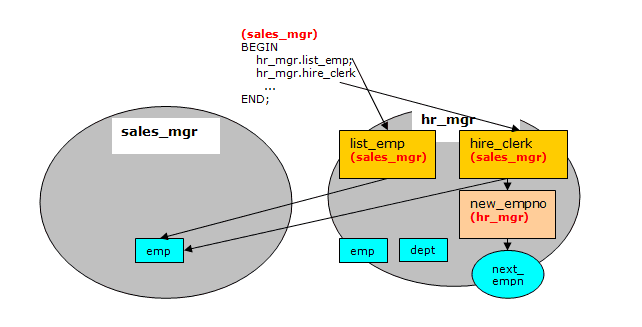
Programs list_emp and hire_clerk will be changed from the default of definer’s rights to invoker’s rights. It will be then illustrated that when sales_mgr runs these programs, they act upon the emp table in sales_mgr’s schema since sales_mgr’s search path and privileges will be used for name resolution and authorization checking.
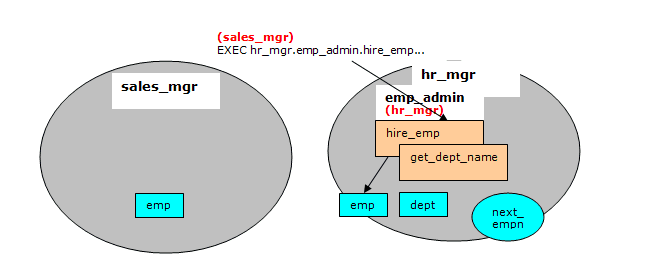
Programs get_dept_name and hire_emp in the emp_admin package will then be executed by sales_mgr. In this case, the dept table and emp table in hr_mgr’s schema will be accessed as hr_mgr is the owner of the emp_admin package which is using definer’s rights. Since the default search path is in effect with the $user placeholder, the schema matching the user (in this case, hr_mgr) is used to find the tables.
Step 1 – Create Database and Users
As user enterprisedb, create the hr database:
CREATE DATABASE hr;
Switch to the hr database and create the users:
\c hr enterprisedb
CREATE USER hr_mgr IDENTIFIED BY password;
CREATE USER sales_mgr IDENTIFIED BY password;
Step 2 – Create the Sample Application
Create the entire sample application, owned by hr_mgr, in hr_mgr’s schema.
\c - hr_mgr
\i /usr/edb/as13/share/edb-sample.sql

BEGIN
CREATE TABLE
CREATE TABLE
CREATE TABLE
CREATE VIEW
CREATE SEQUENCE
        .
        .
        .
CREATE PACKAGE
CREATE PACKAGE BODY
COMMIT
Step 3 – Create the emp Table in Schema sales_mgr
Create a subset of the emp table owned by sales_mgr in sales_mgr’s schema.
\c – hr_mgr
GRANT USAGE ON SCHEMA hr_mgr TO sales_mgr;
\c – sales_mgr
CREATE TABLE emp AS SELECT * FROM hr_mgr.emp WHERE job = 'SALESMAN';
In the above example, the GRANT USAGE ON SCHEMA command is given to allow sales_mgr access into hr_mgr’s schema to make a copy of hr_mgr’s emp table. This step is required in Advanced Server and is not compatible with Oracle databases since Oracle does not have the concept of a schema that is distinct from its user.
Step 4 – Remove Default Privileges
Remove all privileges to later illustrate the minimum required privileges needed.
\c – hr_mgr
REVOKE USAGE ON SCHEMA hr_mgr FROM sales_mgr;
REVOKE ALL ON dept FROM PUBLIC;
REVOKE ALL ON emp FROM PUBLIC;
REVOKE ALL ON next_empno FROM PUBLIC;
REVOKE EXECUTE ON FUNCTION new_empno() FROM PUBLIC;
REVOKE EXECUTE ON PROCEDURE list_emp FROM PUBLIC;
REVOKE EXECUTE ON FUNCTION hire_clerk(VARCHAR2,NUMBER) FROM PUBLIC;
REVOKE EXECUTE ON PACKAGE emp_admin FROM PUBLIC;
Step 5 – Change list_emp to Invoker’s Rights
While connected as user, hr_mgr, add the AUTHID CURRENT_USER clause to the list_emp program and resave it in Advanced Server. When performing this step, be sure you are logged on as hr_mgr, otherwise the modified program may wind up in the public schema instead of in hr_mgr’s schema.
CREATE OR REPLACE PROCEDURE list_emp
AUTHID CURRENT_USER
IS
    v_empno         NUMBER(4);
    v_ename         VARCHAR2(10);
    CURSOR emp_cur IS
        SELECT empno, ename FROM emp ORDER BY empno;
BEGIN
    OPEN emp_cur;
    DBMS_OUTPUT.PUT_LINE('EMPNO    ENAME');
    DBMS_OUTPUT.PUT_LINE('-----    -------');
    LOOP
        FETCH emp_cur INTO v_empno, v_ename;
        EXIT WHEN emp_cur%NOTFOUND;
        DBMS_OUTPUT.PUT_LINE(v_empno || '     ' || v_ename);
    END LOOP;
    CLOSE emp_cur;
END;
Step 6 – Change hire_clerk to Invoker’s Rights and Qualify Call to new_empno
While connected as user, hr_mgr, add the AUTHID CURRENT_USER clause to the hire_clerk program.
Also, after the BEGIN statement, fully qualify the reference, new_empno, to hr_mgr.new_empno in order to ensure the hire_clerk function call to the new_empno function resolves to the hr_mgr schema.
When resaving the program, be sure you are logged on as hr_mgr, otherwise the modified program may wind up in the public schema instead of in hr_mgr’s schema.
CREATE OR REPLACE FUNCTION hire_clerk (
    p_ename         VARCHAR2,
    p_deptno        NUMBER
) RETURN NUMBER
AUTHID CURRENT_USER
IS
    v_empno         NUMBER(4);
    v_ename         VARCHAR2(10);
    v_job           VARCHAR2(9);
    v_mgr           NUMBER(4);
    v_hiredate      DATE;
    v_sal           NUMBER(7,2);
    v_comm          NUMBER(7,2);
    v_deptno        NUMBER(2);
BEGIN
    v_empno := hr_mgr.new_empno;
    INSERT INTO emp VALUES (v_empno, p_ename, 'CLERK', 7782,
        TRUNC(SYSDATE), 950.00, NULL, p_deptno);
    SELECT empno, ename, job, mgr, hiredate, sal, comm, deptno INTO
        v_empno, v_ename, v_job, v_mgr, v_hiredate, v_sal, v_comm, v_deptno
        FROM emp WHERE empno = v_empno;
    DBMS_OUTPUT.PUT_LINE('Department : ' || v_deptno);
    DBMS_OUTPUT.PUT_LINE('Employee No: ' || v_empno);
    DBMS_OUTPUT.PUT_LINE('Name       : ' || v_ename);
    DBMS_OUTPUT.PUT_LINE('Job        : ' || v_job);
    DBMS_OUTPUT.PUT_LINE('Manager    : ' || v_mgr);
    DBMS_OUTPUT.PUT_LINE('Hire Date  : ' || v_hiredate);
    DBMS_OUTPUT.PUT_LINE('Salary     : ' || v_sal);
    DBMS_OUTPUT.PUT_LINE('Commission : ' || v_comm);
    RETURN v_empno;
EXCEPTION
    WHEN OTHERS THEN
        DBMS_OUTPUT.PUT_LINE('The following is SQLERRM:');
        DBMS_OUTPUT.PUT_LINE(SQLERRM);
        DBMS_OUTPUT.PUT_LINE('The following is SQLCODE:');
        DBMS_OUTPUT.PUT_LINE(SQLCODE);
        RETURN -1;
END;
Step 7 – Grant Required Privileges
While connected as user, hr_mgr, grant the privileges needed so sales_mgr can execute the list_emp procedure, hire_clerk function, and emp_admin package. Note that the only data object sales_mgr has access to is the emp table in the sales_mgr schema. sales_mgr has no privileges on any table in the hr_mgr schema.
GRANT USAGE ON SCHEMA hr_mgr TO sales_mgr;
GRANT EXECUTE ON PROCEDURE list_emp TO sales_mgr;
GRANT EXECUTE ON FUNCTION hire_clerk(VARCHAR2,NUMBER) TO sales_mgr;
GRANT EXECUTE ON FUNCTION new_empno() TO sales_mgr;
GRANT EXECUTE ON PACKAGE emp_admin TO sales_mgr;
Step 8 – Run Programs list_emp and hire_clerk
Connect as user, sales_mgr, and run the following anonymous block:
\c – sales_mgr
DECLARE
    v_empno         NUMBER(4);
BEGIN
    hr_mgr.list_emp;
    DBMS_OUTPUT.PUT_LINE('*** Adding new employee ***');
    v_empno := hr_mgr.hire_clerk('JONES',40);
    DBMS_OUTPUT.PUT_LINE('*** After new employee added ***');
    hr_mgr.list_emp;
END;

EMPNO    ENAME
-----    -------
7499     ALLEN
7521     WARD
7654     MARTIN
7844     TURNER
*** Adding new employee ***
Department : 40
Employee No: 8000
Name       : JONES
Job        : CLERK
Manager    : 7782
Hire Date  : 08-NOV-07 00:00:00
Salary     : 950.00
*** After new employee added ***
EMPNO    ENAME
-----    -------
7499     ALLEN
7521     WARD
7654     MARTIN
7844     TURNER
8000     JONES
The table and sequence accessed by the programs of the anonymous block are illustrated in the following diagram. The gray ovals represent the schemas of sales_mgr and hr_mgr. The current user during each program execution is shown within parenthesis in bold red font.
Selecting from sales_mgr’s emp table shows that the update was made in this table.
SELECT empno, ename, hiredate, sal, deptno,
hr_mgr.emp_admin.get_dept_name(deptno) FROM sales_mgr.emp;

 empno | ename  |      hiredate      |   sal   | deptno | get_dept_name
-------+--------+--------------------+---------+--------+---------------
  7499 | ALLEN  | 20-FEB-81 00:00:00 | 1600.00 |     30 | SALES
  7521 | WARD   | 22-FEB-81 00:00:00 | 1250.00 |     30 | SALES
  7654 | MARTIN | 28-SEP-81 00:00:00 | 1250.00 |     30 | SALES
  7844 | TURNER | 08-SEP-81 00:00:00 | 1500.00 |     30 | SALES
  8000 | JONES  | 08-NOV-07 00:00:00 |  950.00 |     40 | OPERATIONS
(5 rows)
The following diagram shows that the SELECT command references the emp table in the sales_mgr schema, but the dept table referenced by the get_dept_name function in the emp_admin package is from the hr_mgr schema since the emp_admin package has definer’s rights and is owned by hr_mgr. The default search path setting with the $user placeholder resolves the access by user hr_mgr to the dept table in the hr_mgr schema.

Step 9 – Run Program hire_emp in the emp_admin Package
While connected as user, sales_mgr, run the hire_emp procedure in the emp_admin package.
EXEC hr_mgr.emp_admin.hire_emp(9001,
'ALICE','SALESMAN',8000,TRUNC(SYSDATE),1000,7369,40);
This diagram illustrates that the hire_emp procedure in the emp_admin definer’s rights package updates the emp table belonging to hr_mgr since the object privileges of hr_mgr are used, and the default search path setting with the $user placeholder resolves to the schema of hr_mgr.
Now connect as user, hr_mgr. The following SELECT command verifies that the new employee was added to hr_mgr’s emp table since the emp_admin package has definer’s rights and hr_mgr is emp_admin’s owner.
\c – hr_mgr
SELECT empno, ename, hiredate, sal, deptno,
hr_mgr.emp_admin.get_dept_name(deptno) FROM hr_mgr.emp;

empno  | ename  |      hiredate      |   sal   | deptno | get_dept_name
-------+--------+--------------------+---------+--------+---------------
  7369 | SMITH  | 17-DEC-80 00:00:00 |  800.00 |     20 | RESEARCH
  7499 | ALLEN  | 20-FEB-81 00:00:00 | 1600.00 |     30 | SALES
  7521 | WARD   | 22-FEB-81 00:00:00 | 1250.00 |     30 | SALES
  7566 | JONES  | 02-APR-81 00:00:00 | 2975.00 |     20 | RESEARCH
  7654 | MARTIN | 28-SEP-81 00:00:00 | 1250.00 |     30 | SALES
  7698 | BLAKE  | 01-MAY-81 00:00:00 | 2850.00 |     30 | SALES
  7782 | CLARK  | 09-JUN-81 00:00:00 | 2450.00 |     10 | ACCOUNTING
  7788 | SCOTT  | 19-APR-87 00:00:00 | 3000.00 |     20 | RESEARCH
  7839 | KING   | 17-NOV-81 00:00:00 | 5000.00 |     10 | ACCOUNTING
  7844 | TURNER | 08-SEP-81 00:00:00 | 1500.00 |     30 | SALES
  7876 | ADAMS  | 23-MAY-87 00:00:00 | 1100.00 |     20 | RESEARCH
  7900 | JAMES  | 03-DEC-81 00:00:00 |  950.00 |     30 | SALES
  7902 | FORD   | 03-DEC-81 00:00:00 | 3000.00 |     20 | RESEARCH
  7934 | MILLER | 23-JAN-82 00:00:00 | 1300.00 |     10 | ACCOUNTING
  9001 | ALICE  | 08-NOV-07 00:00:00 | 8000.00 |     40 | OPERATIONS
(15 rows)