Prepare the DR cluster for recovery. Install WarehousePG and whpg-dr, create a restore configuration file, and run whpg-dr configure restore to prepare the cluster to receive restores from the storage repository. Run all commands as gpadmin on the DR coordinator. Once configured, proceed to choose a recovery method.
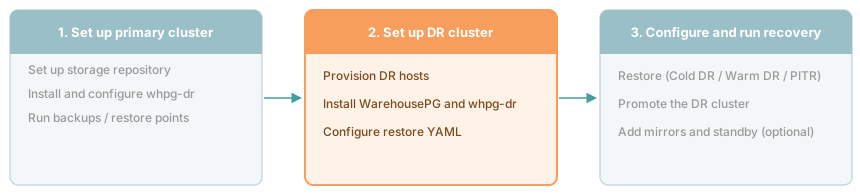
Whether to complete this step in advance depends on your DR mode. For warm DR, complete it before a failure occurs so the cluster can start replaying WAL immediately. For cold DR, you can do it at recovery time, though recording the cluster details in advance saves time when a failure occurs.
Important
You don't need a pre-provisioned DR cluster and can configure it at recovery time. However, some of the information you'll need to do that can't be retrieved once the primary cluster is down. Record the following before a failure occurs and store it somewhere accessible without the primary, such as the storage repository, a secrets manager, or version control:
- The exact WHPG patch version and OS installed on the primary
- The number of primary segments
- The source cluster name (as set in the backup YAML)
- Storage credentials and bucket or path details
Prerequisites
Confirm that the DR cluster meets these requirements before starting:
- DR hosts provisioned and reachable from the DR coordinator over SSH as
gpadmin. You need one coordinator host and enough segment hosts to hold all primary segments. The host count doesn't need to match the primary, but the segment count must. The DR hosts don't need to be the same hardware type as the primary — you can restore to different instance types or cloud providers, as long as the OS and WarehousePG version match. - Access to the storage repository from all DR hosts. For NFS, the path must be mounted read-write. For S3, credentials must be available on all hosts. S3 requires WarehousePG 7.x.
- No standalone
barmanorbarman-clipackages installed on any DR host. Theedb-whpg-drRPM conflicts with them.
Installing WarehousePG on the DR cluster
Install WarehousePG on all DR hosts at the exact same patch version and OS as the primary cluster. Follow the WarehousePG install guide through Creating the Data Storage Areas, then stop. When creating data directories, create only the coordinator and primary segment directories and leave them empty, as whpg-dr restore populates them from the base backup and rejects non-empty targets. Don't create mirror directories, and don't run gpinitsystem. Mirrors and standby coordinators aren't part of the restored cluster.
Install any extension software that the primary cluster uses. Extension data is restored automatically as part of the cluster state, but the software packages and libraries must already be present on the DR hosts before the restore starts. Anything listed in shared_preload_libraries is loaded at startup, and the cluster won't start if those libraries are missing.
Installing whpg-dr
Install the edb-whpg-dr RPM on the DR coordinator and all DR segment hosts. Run these steps as gpadmin on the DR coordinator.
Download the
edb-whpg-drpackage to the DR coordinator:export EDB_SUBSCRIPTION_TOKEN=<your-token> curl -1sSLf "https://downloads.enterprisedb.com/$EDB_SUBSCRIPTION_TOKEN/gpsupp/setup.rpm.sh" | sudo -E bash sudo dnf download edb-whpg-dr
export EDB_SUBSCRIPTION_TOKEN=<your-token> curl -1sSLf "https://downloads.enterprisedb.com/$EDB_SUBSCRIPTION_TOKEN/gpsupp/setup.rpm.sh" | sudo -E bash sudo yumdownloader edb-whpg-dr
Create a file
all_hostslisting every DR host:cdw-dr sdw1-dr sdw2-dr sdw3-dr
Copy the RPM to all DR hosts. In the file name, replace
<version>,<dist>, and<arch>with the values from the downloaded file, for exampleedb-whpg-dr-1.1.0.el9.x86_64.rpm:gpsync -f all_hosts edb-whpg-dr-<version>.<dist>.<arch>.rpm =:/tmp/
gpscp -f all_hosts edb-whpg-dr-<version>.<dist>.<arch>.rpm =:/tmp/
Install the package on all DR hosts:
gpssh -f all_hosts -u gpadmin -e "sudo dnf install -y /tmp/edb-whpg-dr-<version>.<dist>.<arch>.rpm"
gpssh -f all_hosts -u gpadmin -e "sudo yum install -y /tmp/edb-whpg-dr-<version>.<dist>.<arch>.rpm"
Add the
whpg-drbin directory togpadmin'sPATH:echo 'export PATH=$PATH:/usr/edb/whpg-dr/bin' >> ~/.bashrc && source ~/.bashrc
Verify the installation on the DR coordinator:
whpg-dr --version
By default, whpg-dr stores its configuration, state, and logs under $HOME/.whpg-dr. To change this on the DR cluster, set WHPG_DR_HOME as described in Customizing the home directory.
Upgrading whpg-dr
Upgrade whpg-dr on the DR coordinator and all DR segment hosts. The RPM bundles its own Barman virtual environment, so you don't need to change the system Python. Upgrade the primary cluster hosts the same way, as described in Upgrading the package.
Make sure no backup or restore is running, and pause any
whpg-drcron jobs until you've upgraded all hosts. The upgrade replaces the bundled Barman.On the DR coordinator, download the newer package version from the EDB repository:
export EDB_SUBSCRIPTION_TOKEN=<your-token>
curl -1sSLf "https://downloads.enterprisedb.com/$EDB_SUBSCRIPTION_TOKEN/gpsupp/setup.rpm.sh" | sudo -E bash
sudo dnf download edb-whpg-dr
export EDB_SUBSCRIPTION_TOKEN=<your-token>
curl -1sSLf "https://downloads.enterprisedb.com/$EDB_SUBSCRIPTION_TOKEN/gpsupp/setup.rpm.sh" | sudo -E bash
sudo yumdownloader edb-whpg-dr
Copy the RPM to all DR hosts, using the same
all_hostsfile as in Installing whpg-dr:gpsync -f all_hosts edb-whpg-dr-<version>.<dist>.<arch>.rpm =:/tmp/
gpscp -f all_hosts edb-whpg-dr-<version>.<dist>.<arch>.rpm =:/tmp/
Upgrade the package on all DR hosts:
gpssh -f all_hosts -u gpadmin -e "sudo dnf upgrade -y /tmp/edb-whpg-dr-<version>.<dist>.<arch>.rpm"
gpssh -f all_hosts -u gpadmin -e "sudo yum upgrade -y /tmp/edb-whpg-dr-<version>.<dist>.<arch>.rpm"
Verify the upgrade on the DR coordinator:
whpg-dr --version
Note
If your cluster uses tablespaces and POSIX storage, you can't restore backups taken with version 1.0.0. They don't contain tablespace data, and the restore fails. Take a new full backup after upgrading.
Creating the restore configuration file
Create a YAML file that describes the storage repository and the DR cluster topology, then run whpg-dr configure restore to prepare the cluster. The storage block must point to the same repository the primary cluster writes to. The RPM installs ready-to-adapt starting points under /usr/edb/whpg-dr/examples/restore/.
The cluster name and storage configuration must match your primary cluster. The restore YAML also includes fields that don't exist in the backup configuration: coordinator_host, coordinator_data_directory, segment_hosts, data_directory, and data_directory_prefix. These fields describe your DR environment and can be set to match your infrastructure. The DR cluster doesn't need to match the primary's host layout, hostname scheme, or directory structure. data_directory accepts either a single path or a list of mount-point directories to spread segments across multiple disks; use data_directory_overrides to set a different path for specific hosts.
Using POSIX storage
Create a restore YAML file with storage.type: posix when the DR hosts can mount the same NFS path as the primary:
source_cluster_name: my_cluster

storage:
  type: posix
  path: /data/backups/whpg-dr

coordinator_host: cdw-dr
coordinator_data_directory: /data/coordinator

segment_hosts:
  - sdw1-dr
  - sdw2-dr
  - sdw3-dr

data_directory: /data/primary
data_directory_prefix: gpseg
For a full description of all available fields, see Restore configuration YAML.
Using S3 storage
Create a restore YAML file with storage.type: s3 if all DR hosts have network access to the S3 endpoint. S3 requires WarehousePG 7.x.
source_cluster_name: my_cluster

storage:
  type: s3
  bucket: my-dr-bucket
  prefix: whpg/my_cluster
  region: us-east-1
  access_key_id: your_aws_access_key_id
  secret_access_key: your_aws_secret_access_key

coordinator_host: cdw-dr
coordinator_data_directory: /data/coordinator

segment_hosts:
  - sdw1-dr
  - sdw2-dr
  - sdw3-dr

data_directory: /data/primary
data_directory_prefix: gpseg
Important
If WAL compression is enabled in the backup configuration, set the same barman_options.compression value in the restore YAML. With whpg-dr 1.1.0, a mismatch makes the restore fail with a WAL file is missing error and marks the backup as failed in the storage repository. For recovery steps, see WAL file is missing during S3 restore.
To improve restore performance, set jobs to parallelize the base-backup copy within each segment, and wal_prefetch to fetch WAL files in parallel during replay. Changes to barman_options take effect on the next restore without requiring a new full restore. Re-run whpg-dr configure restore after updating the YAML.
For a full description of all fields including other credential methods, see Restore configuration YAML.
Overriding data directories per host
Use data_directory_overrides when one or more DR hosts have a different disk layout from the rest. Each value takes the same shape as data_directory, either a single path or a list of mount-point directories.
To point a specific host to a different base path:
segment_hosts:
  - sdw1-dr
  - sdw2-dr
  - sdw3-dr

data_directory: /data/primary
data_directory_prefix: gpseg

data_directory_overrides:
  sdw3-dr: /scratch/primary
To spread a host's segments across multiple mount points:
data_directory: /data/primary
data_directory_prefix: gpseg

data_directory_overrides:
  sdw3-dr:
    - /data1/primary
    - /data2/primary
Preparing the DR cluster for restore
Run whpg-dr configure restore to set up the DR cluster for restore operations. The command doesn't restore any data, but generates the necessary configuration files to run a restore:
whpg-dr configure restore /home/gpadmin/restore.yaml
The command:
- Reads
segment_configuration.csvfrom the storage repository to map source segments to DR hosts. The segment count always matches the source, but the DR host count can differ, with content IDs distributed round-robin acrosssegment_hosts. - Generates Barman configuration files under
$WHPG_DR_HOME/<cluster_name>/restore/barman_conf/and distributes them to the coordinator and all DR segment hosts. For S3 storage, also writes AWS credential files to all hosts. - Saves a copy of the restore YAML to
$WHPG_DR_HOME/<cluster_name>/restore/config.yaml. - Saves the segment mapping to
$WHPG_DR_HOME/<cluster_name>/restore/restore.json.
Use --dry-run to preview what files will be generated without writing anything:
whpg-dr configure restore /home/gpadmin/restore.yaml --dry-run
After the command completes, check what backups and restore points are available in the repository:
whpg-dr list-backup my_cluster
By default, configure restore targets the backup associated with the latest restore point. To target a different backup, re-run the command with --backup-name using one of the names returned by list-backup:
whpg-dr configure restore /home/gpadmin/restore.yaml --backup-name 20260601T120000_base_backup
For next steps, see Cold DR, Warm DR, or Point-in-time recovery.