
Preview PostgreSQL 18's OAuth2 Authentication (3) - Enhancing a PostgreSQL Client Library to Speak OAUTHBEARER

Introduction
PostgreSQL 18 introduces a significant new feature: OAuth2 authentication. This enables PostgreSQL to authenticate users using OAuth2 tokens instead of traditional username/password pairs. In this guide, we'll explore how to implement OAuth Bearer Token authentication in a PostgreSQL client library, using the popular pgx Go driver as our reference implementation.
This blog series contains 3 articles:
- Part-1: Explore how PostgreSQL 18 OAuth2 authentication works
- Part-2: Write a custom validator with Rust
- Part-3: (this article) Enhancing a PostgreSQL client library to speak OAUTHBEARER
All the code mentioned in this article can be found in a pgx fork by the author: xugy99/pgx
OAUTHBEARER Mechanism
The OAUTHBEARER SASL mechanism allows clients to authenticate using OAuth 2.0 Bearer tokens. PostgreSQL integrates OAUTHBEARER authentication into its existing SASL authentication flow. You can find the complete OAUTHBEARER SASL flow in this blog series's Part-1.
Understanding pgconn in pgx
pgx provides the ConnectWithOptions() function to accept a PostgreSQL cluster URL and options for creating a new connection. An example of using it to execute a query looks like this:
func main() {
   // ... ...
   url := "postgres://joe:joespassword@localhost:5432/my_db"
   conn, err = pgx.ConnectWithOptions(context.Background(), url, opts)
   if err != nil {
       log.Fatalf("Unable to connect to database: %v\n", err)
   }
   // run sql
   rows, err := conn.Query(context.Background(), *sql)
   if err != nil {
       log.Fatalf("Failed to execute SQL: %v\n", err)
   }
   defer rows.Close()
   // collect rows
   // ... ...
}
The url from the above example contains the classic username and password, and the function call returns a ready-to-use pgconn object that can be used for subsequent queries.
The pgx.ConnectWithOptions() flow involves URL parsing, authentication method selection, and connection establishment tasks before returning. Let's examine these steps in more detail.
1. URL Parsing
//
// from pgconn/pgconn.go in github.com/xugy99/pgx
//
func ConnectWithOptions(ctx context.Context, connString string, options ParseConfigOptions) (*Conn, error) {
   connConfig, err := ParseConfigWithOptions(connString, options)
   if err != nil {
       return nil, err
   }
   return connect(ctx, connConfig)
}
ParseConfigWithOptions() in pgconn/config.go handles two URL formats:
- URL format:
postgres://user:pass@host:port/db?param=value→ parsed viaparseURLSettings() - Keyword/value format:
host=localhost port=5432 user=myuser→ parsed viaparseKeywordValueSettings()
Key parsing logic:
//
// from pgconn/config.go in github.com/xugy99/pgx
//
if strings.HasPrefix(connString, "postgres://") || strings.HasPrefix(connString, "postgresql://") {
   connStringSettings, err = parseURLSettings(connString)
} else {
   connStringSettings, err = parseKeywordValueSettings(connString)
}
2. Authentication Method Selection
After establishing a TCP/TLS connection, connectOne() sends a startup message and waits for the server's authentication request. Let's examine pgconn/pgconn.go's connectOne():
//
// from pgconn/pgconn.go in github.com/xugy99/pgx
//
func connectOne(ctx context.Context, config *Config, connectConfig *connectOneConfig,
    ignoreNotPreferredErr bool,
) (*PgConn, error) {
   // ... ...
   switch msg := msg.(type) {
   case *pgproto3.AuthenticationOk:
       // No auth needed
   case *pgproto3.AuthenticationCleartextPassword:
       err = pgConn.txPasswordMessage(pgConn.config.Password)
   case *pgproto3.AuthenticationMD5Password:
       digestedPassword := "md5" + hexMD5(hexMD5(pgConn.config.Password+pgConn.config.User)+string(msg.Salt[:]))
       err = pgConn.txPasswordMessage(digestedPassword)
   case *pgproto3.AuthenticationSASL:
       err = pgConn.scramAuth(msg.AuthMechanisms)
       if err != nil {
           pgConn.conn.Close()
           return nil, newPerDialConnectError("failed SASL auth", err)
       }
   case *pgproto3.AuthenticationGSS:
   err = pgConn.gssAuth()  // GSSAPI/Kerberos
   }
   // ... ...
}
The authentication completes when the server responds with AuthenticationOk, transitioning the connection to the connStatusIdle state.
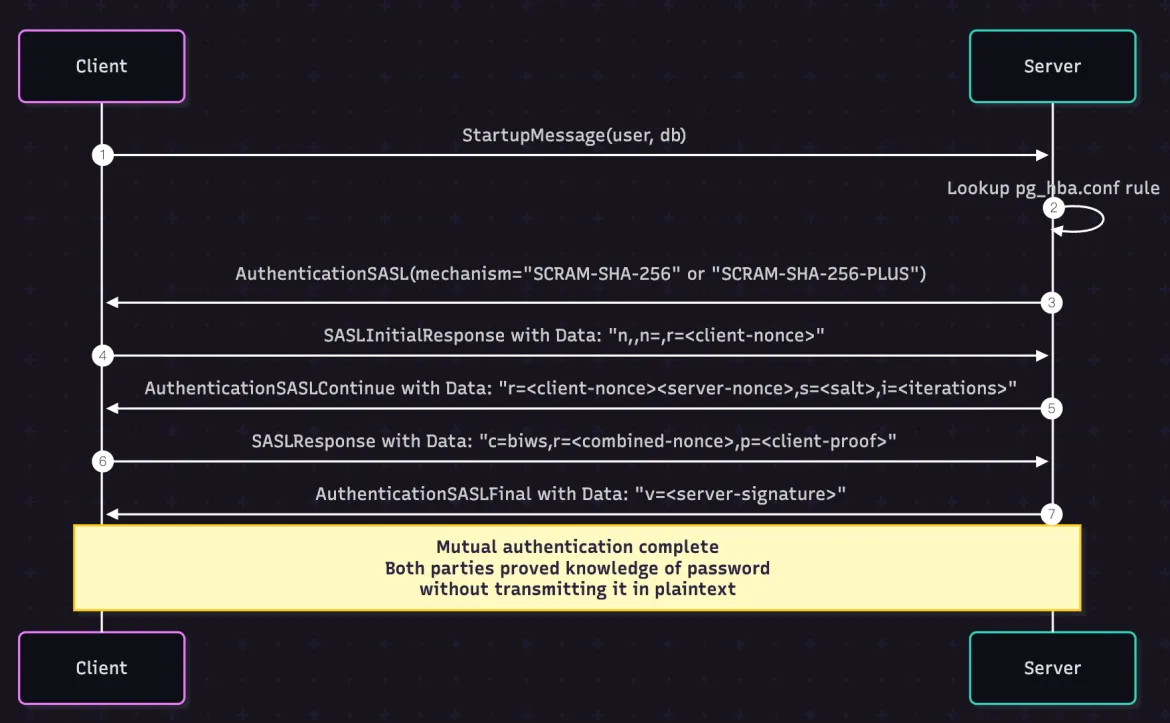
The pgproto3.AuthenticationSASL branch is worth noting, as SCRAM (Salted Challenge Response Authentication Mechanism) is the only implemented authentication method based on SASL in pgx today. When the client receives the AuthenticationSASL message, it launches the SCRAM authentication flow directly.
Learn How SCRAM is Implemented
PostgreSQL supports SCRAM-SHA-256 and SCRAM-SHA-256-PLUS. Here's how the handshake works (in a simplified diagram):
If we revisit the code
//
// from pgconn/pgconn.go in github.com/xugy99/pgx
//
func connectOne(ctx context.Context, config *Config, connectConfig *connectOneConfig,
    ignoreNotPreferredErr bool,
) (*PgConn, error) {
   // ... ...
   // ... ...
   case *pgproto3.AuthenticationSASL:
       err = pgConn.scramAuth(msg.AuthMechanisms)
       if err != nil {
           pgConn.conn.Close()
           return nil, newPerDialConnectError("failed SASL auth", err)
       }
   // ... ...
   // ... ...
}
The msg.AuthMechanisms specifies the mechanism (SCRAM-SHA-256), and the pgConn.scramAuth() handles the negotiation process for the next 4 messages in the SASL flow:
- SASLInitialResponse
- AuthenticationSASLContinue
- SASLResponse
- AuthenticationSASLFinal
Adding OAUTHBEARER, by Cloning the SCRAM Pattern
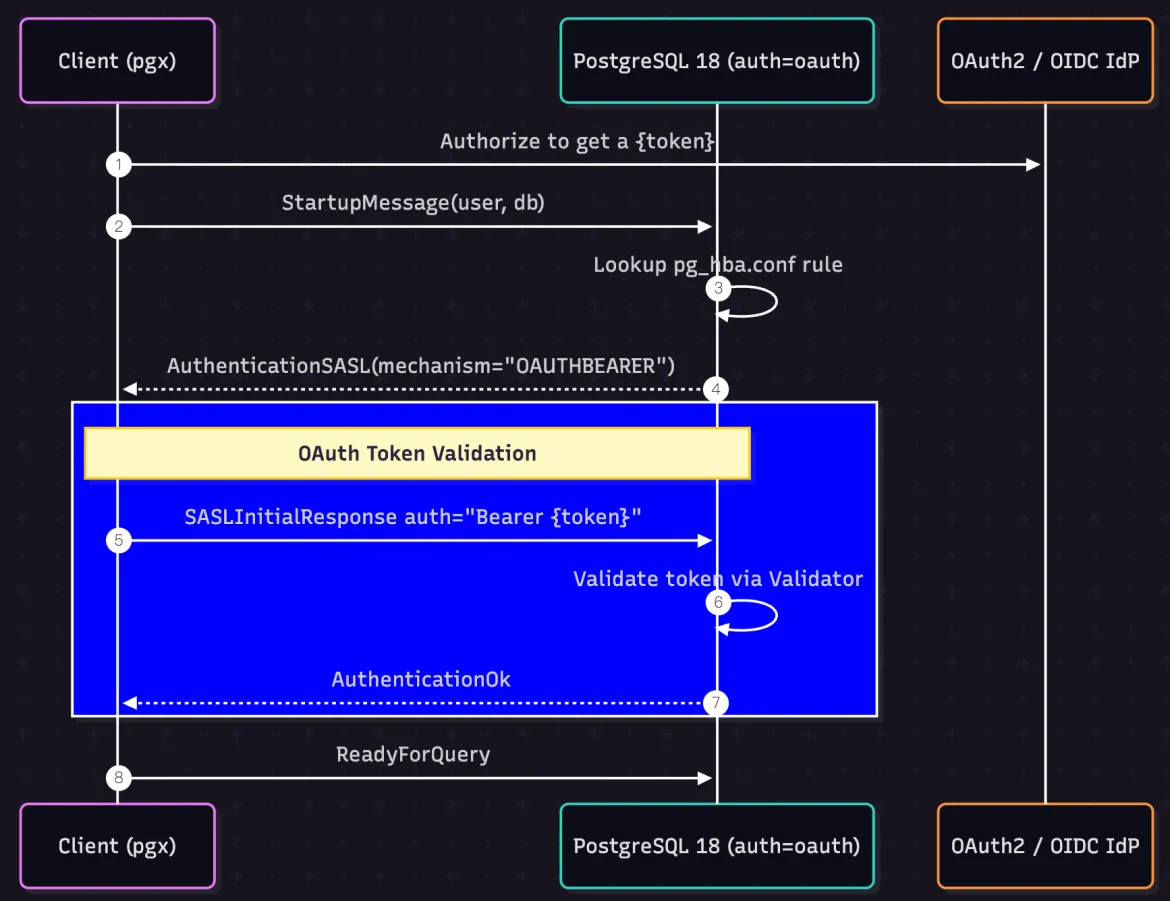
Following the same pattern, checking for OAUTHBEARER from the AuthenticationSASL message and using a new function to handle the OAuth2-specific authentication flow will work seamlessly.
Note that the client could always send SASLInitialResponse auth="" to request OIDC discovery and use the authorize endpoint to complete the OAuth2 login flow, which is the more canonical way to follow the PostgreSQL 18 OAuth2 design. We will skip this step and assume the token has already been obtained, sending the token via SASLInitialResponse directly in this article. The flow we will implement looks like this:
1. Authentication Flow Implementation
The core OAuth authentication logic is implemented in the connection establishment process:
//
// from pgconn/auth_oauth.go in github.com/xugy99/pgx
//
func (c *PgConn) oauthAuth() error {
   // Check if we have a pre-configured bearer token
   if c.config == nil || c.config.OAuthBearerToken == "" {
       return fmt.Errorf("server requires OAuthBearerToken for this connection")
   }
   // Construct a SASLInitialResponse message
   reply := &pgproto3.SASLInitialResponse{
       AuthMechanism: "OAUTHBEARER",
       Data:          buildOAuthInitialResponse(c.config.OAuthBearerToken),
   }
   // Use frontend.Send() to populate the send buffer and flush it to the wire
   c.frontend.Send(reply)
   if err := c.flushWithPotentialWriteReadDeadlock(); err != nil {
       return err
   }
   // Wait for AuthenticationOk message
   _, err := c.rxOAuthSASLOk()
   return err
}
Note some key details:
- Token Population: We get the token from the passed-in
pgconnconnection's config. We'll see how to configure the config object to carry the token in a later section. - SASL Integration: We reuse the existing SASL message structure. The
Datapayload is constructed by a new functionbuildOAuthInitialResponse()that we'll discuss later. - Response Handling: The
rxOAuthSASLOk()waits for a response from the PostgreSQL server, expecting aAuthenticationOkmessage.
2. OAuth Initial Response Format
Let's implement the buildOAuthInitialResponse() function to construct an RFC 7628-compliant OAuth initial response.
Looking at RFC 7628's section 4.1. Successful Bearer Token Exchange:
[Initial connection and TLS establishment...]
S: * OK IMAP4rev1 Server Ready
C: t0 CAPABILITY
S: * CAPABILITY IMAP4rev1 AUTH=OAUTHBEARER SASL-IR
S: t0 OK Completed
C: t1 AUTHENTICATE OAUTHBEARER bixhPXVzZXJAZXhhbXBsZS5jb20sAWhv
     c3Q9c2VydmVyLmV4YW1wbGUuY29tAXBvcnQ9MTQzAWF1dGg9QmVhcmVyI
     HZGOWRmdDRxbVRjMk52YjNSbGNrQmhiSFJoZG1semRHRXVZMjl0Q2c9PQ
     EB
S: t1 OK SASL authentication succeeded
As required by IMAP [RFC3501], the payloads are base64 encoded.  The
decoded initial client response (with %x01 represented as ^A and long
lines wrapped for readability) is:
n,a=user@example.com,^Ahost=server.example.com^Aport=143^A
auth=Bearer vF9dft4qmTc2Nvb3RlckBhbHRhdmlzdGEuY29tCg==^A^A
And here's what PostgreSQL 18's libpq implements in backend/libpq/auth-oauth.c:
static int
oauth_exchange(void *opaq, const char *input, int inputlen,
              char **output, int *outputlen, const char **logdetail)
{
   // ... ...
   //

   /* All remaining fields are separated by the RFC's kvsep (\x01). */
   if (*p != KVSEP)
       ereport(ERROR,
               errcode(ERRCODE_PROTOCOL_VIOLATION),
               errmsg("malformed OAUTHBEARER message"),
               errdetail("Key-value separator expected, but found character \"%s\".",
                           sanitize_char(*p)));
   p++;
   auth = parse_kvpairs_for_auth(&p);
   if (!auth)
       ereport(ERROR,
               errcode(ERRCODE_PROTOCOL_VIOLATION),
               errmsg("malformed OAUTHBEARER message"),
               errdetail("Message does not contain an auth value."));
   }
   // ... ...
   //
}
To summarize what we need to do to meet RFC 7628 and PostgreSQL 18 requirements:
- Format:
n,,^Aauth=Bearer <token>^A^A - Authorization identity:
n,indicates no authorization identity - Key-value pairs:
^A(0x01) separates key-value pairs - Token format:
auth=Bearer <token>follows OAuth 2.0 Bearer token format, and we need to base64 encode the rawtoken
Note:
^A=0x01and thehostandportfields are not required per RFC 7628.
As a result, this function becomes quite simple:
//
// from pgconn/auth_oauth.go in github.com/xugy99/pgx
//
func buildOAuthInitialResponse(token string) []byte {
   var b bytes.Buffer
   b.WriteString("n,,")           // No authorization identity
   b.WriteByte(0x01)              // Key-value separator
   b.WriteString("auth=Bearer ")  // OAuth Bearer token prefix
   b.WriteString(token)           // Actual token
   b.WriteByte(0x01)              // Key-value separator
   b.WriteByte(0x01)              // Final separator
   return b.Bytes()
}
Waiting for AuthenticationOk
The rxOAuthSASLOk() function blocks while waiting for the next response message from the PostgreSQL server.
//
// from pgconn/auth_oauth.go in github.com/xugy99/pgx
//
func (c *PgConn) rxOAuthSASLOk() (*pgproto3.AuthenticationOk, error) {
   // Block until we receive a message from the PostgreSQL server
   msg, err := c.receiveMessage()
   if err != nil {
       return nil, err
   }
   switch m := msg.(type) {
   case *pgproto3.AuthenticationOk:
       return m, nil
   case *pgproto3.ErrorResponse:
       return nil, ErrorResponseToPgError(m)
   // AuthenticationSASLContinue is received in when the token
   // is empty or invalid in SASLInitialResponse phase
   //case *pgproto3.AuthenticationSASLContinue:
   //      return nil, fmt.Errorf(": %s", string(m.Data))
   }
   return nil, fmt.Errorf("expected AuthenticationOk message but received unexpected %T", msg)
}
Note that we should not see
AuthenticationSASLContinuein this article's example since we will always send a valid token bySASLInitialResponse. However, developers should still consider implementing handling forAuthenticationSASLContinuebecause PostgreSQL returns the OIDC discovery URL to tell the client to re-authenticate with the designated IdP if the custom validator fails to validate the passed token.
3. Connection Logic Integration
Now that we have a function oauthAuth() to handle AuthenticationSASL with the OAUTHBEARER mechanism, it can be integrated into the main connection flow in pgconn/pgconn.go:
//
// from pgconn/pgconn.go in github.com/xugy99/pgx
//
func connectOne(ctx context.Context, config *Config, connectConfig *connectOneConfig,
    ignoreNotPreferredErr bool,
) (*PgConn, error) {
   // ... ...
   // ... ...
       case *pgproto3.AuthenticationSASL:
           // If the mechanism is OAUTHBEARER
           if slices.Contains(msg.AuthMechanisms, "OAUTHBEARER") {
               err = pgConn.oauthAuth()
               if err != nil {
                   pgConn.conn.Close()
                   return nil, newPerDialConnectError("failed OAUTHBEARER auth", err)
               }
               continue
           }
           // Fall back to SCRAM authentication
           err = pgConn.scramAuth(msg.AuthMechanisms)
           // ... error handling
   // ... ...

   // ... ...
}
4. Configuration Extensions
Remember that this article's example relies on the pgconn's config to carry the already issued bearer token. Here's the final part we need to implement in pgconn/config.go:
//
// from pgconn/config.go in github.com/xugy99/pgx
//
// Config is the settings used to establish a connection to a PostgreSQL server. It must be created by [ParseConfig]. A
// manually initialized Config will cause ConnectConfig to panic.
type Config struct {
   // ... existing fields ...
   // The preconfigured OAuth2 Bearer Token for authentication
   OAuthBearerToken string
}

// ParseConfigOptions extension
type ParseConfigOptions struct {
   // ... existing fields ...
   // The callback function to get the OAuth bear token
   GetOAuthBearerToken GetOAuthBearerTokenFunc
}

type GetOAuthBearerTokenFunc func(ctx context.Context) string
The GetOAuthBearerTokenFunc() is a callback that can be used by pgx.ConnectWithOptions()'s options for getting the OAuth 2.0 token. We will implement a simple logic to get the token from an environment variable in the following test command program.
Practical Usage Examples
Token Retrieval
Here's how to use OAuth authentication by leveraging the GetOAuthBearerTokenFunc as a closure:
func main() {
   // ... ...
   // ... ...
   opts.GetOAuthBearerToken = func(ctx context.Context) string {
       if et := os.Getenv("OAUTH_BEARER_TOKEN"); et != "" {
           return et
       }
       log.Println("using default fake token, you should expect to see login failure")
       return "whatever_token"
   }
   conn, err := pgx.ConnectWithOptions(context.Background(), *url, opts)
   // handling error ... ...
   // ... ...
}
Complete Example
Here's a complete example that demonstrates using this enhanced pgx library for OAuth authentication with a beautiful table output:
//
// from examples/oauthtest/main.go in github.com/xugy99/pgx
//
package main
import (
   "context"
   "flag"
   "fmt"
   "log"
   "os"
   "github.com/jackc/pgx/v5"
   "github.com/pterm/pterm"
)
var (
   sql = flag.String("sql", "select version()", "SQL query to execute")
   url = flag.String("url", "postgres://joe@localhost:5432/my_db", "Database URL")
)
func main() {
   var (
       err  error
       opts pgx.ParseConfigOptions
   )
   flag.Parse()
   if *url == "" {
       log.Fatal("missing url")
   }
   // connect to server
   opts.GetOAuthBearerToken = func(ctx context.Context) string {
       if et := os.Getenv("OAUTH_BEARER_TOKEN"); et != "" {
           return et
       }
       log.Println("using default fake token, you should expect to see login failure")
       return "whatever_token"
   }
   conn, err := pgx.ConnectWithOptions(context.Background(), *url, opts)
   if err != nil {
       log.Fatalf("Unable to connect PostgreSQL by OAUTHBEARER: %v\n", err)
   }
   defer conn.Close(context.Background())
   // run sql
   rows, err := conn.Query(context.Background(), *sql)
   if err != nil {
       log.Fatalf("Failed to execute SQL: %v\n", err)
   }
   defer rows.Close()
   // convert to pterm table and print the result
   data := pterm.TableData{{}}
   //   - header row
   fieldDescriptions := rows.FieldDescriptions()
   for _, fd := range fieldDescriptions {
       data[0] = append(data[0], string(fd.Name))
   }
   //   - data row
   for rows.Next() {
       if rows.Err() == pgx.ErrNoRows {
           break
       }
       var row []string
       columns, _ := rows.Values()
       for _, v := range columns {
           row = append(row, fmt.Sprintf("%v", v))
       }
       data = append(data, row)
   }
   pterm.DefaultTable.
       WithBoxed(true).
       WithHasHeader(true).
       WithHeaderRowSeparator("-").
       WithData(data).
       Render() // show it
}
Let's Run This Example
Get a Token
If you still have the PostgreSQL 18 RC1 server set up from this blog series' Part-2, you can use `psql` to get the token from the trace:
PGOAUTHDEBUG=UNSAFE psql "postgres://joe@localhost:5432/my_db?oauth_issuer=http://your-oauth-server/auth&oauth_client_id=your-client-id" -c "SELECT current_user, session_user, version()"The output contains the access_token from the trace, something like
[libcurl] <   "access_token": "eyJhbGciOiJSUzI1NiIsImtpZCI6ImQ2YThlYTIxZjllN2QzYmJhNTA0NWNhZDBhN2ExZmY1MGM1ZTRkMzgifQ.eyJpc3MiOiJodHRwOi8vbG9jYWxob3N0OjU1NTYvYXV0aCIsInN1YiI6IkNpUmtOakkzTmpnME9TMDRNR1prTFRSak5Ea3RZak5oTkMwd1pUWTFObUpsTVRVeVpUQVNCV3h2WTJGcyIsImF1ZCI6InlvdXItY2xpZW50LWlkIiwiZXhwIjoxNzU4MzczMzMwLCJpYXQiOjE3NTgyODY5MzAsImF0X2hhc2giOiJDLUsyTUlwaG42VGUxUE5lMzlEXy1RIiwibmFtZSI6IkpvZSBEb2UifQ.LJXaixCj9tLNeY_kLxgPH0kn497dEtoHpLswLBVBUh5z7rE46Ixt72xxeHVxHke32fjjnsE3Zh_rR4pcUspkfl7a_L4ElZZaI2AK6e_4YX5x3GHN4yazxgBS7a5U8cUYt5s6Gizox6199Mm50jg5Ho9AHoldkV2JxE6foaSHrp2EZr6zM4ZWPeW_EBC0GVB4ngjaYsaEjAqNLUVePviqv6H70omM5GF6JyFxSGYTpbpUuji8S3CmTCFKJaDNjgk2R5BFrLzLhJaXyPjdcBpDLcZKrKc4NtVCSptAVOLJto5qr1ICeLGanGgg4q-BA-EtbKSd53Dxac_Uu4lmrPJycg",<0A>
[libcurl] <   "token_type": "bearer",<0A>
[libcurl] <   "expires_in": 86399,<0A>
Just save the access_token for the next step:
export OAUTH_BEARER_TOKEN=<access_token>Run the Command
Simply run:
cd examples/oauthtest
go run main.go -url 'postgres://joe@localhost:5432/my_db' -sql 'select current_user,session_user,version()'
and you should see:
┌──────────────────────────────────────────────────────────────────────────────────────────────────────────────────────────────────────────────────┐
| current_user | session_user | version                                                                                                            |
| ------------------------------------------------------------------------------------------------------------------------------------------------ |
| joe          | joe          | PostgreSQL 18rc1 on aarch64-apple-darwin24.6.0, compiled by Apple clang version 17.0.0 (clang-1700.0.13.5), 64-bit |
└──────────────────────────────────────────────────────────────────────────────────────────────────────────────────────────────────────────────────┘
An independent token retrieval and refresh mechanism could be implemented in pgxpooling's config.BeforeConnect() callback to ensure that new connections created in the pool are authenticated with fresh tokens.
What is Missing?
Handling AuthenticationSASLContinue
The AuthenticationSASLContinue handling for PostgreSQL server-returned OIDC discovery is not implemented by the example code for pgx in this article. The behavior for how to respond to this message on the client side depends on what the program wants to implement:
- It could simply report an error if the token has expired or is invalid when the program's business logic wants to delegate the OAuth2 authorization flow to a separate component or system.
- It could also follow the pattern of "authorize with the IdP specified by the PostgreSQL server" if the program wants to behave as a generic PostgreSQL client.
PGX Pooling
A pre-configured token can also be integrated with pgx connection pooling. The linked code from https://github.com/xugy99/pgx does not contain this part. It could look something like this:
config, err := pgxpool.ParseConfig("postgres://joe@localhost:5432/my_db")
if err != nil {
   return err
}
config.ConnConfig.OAuthBearerToken = "my_token"
pool, err := pgxpool.NewWithConfig(context.Background(), config)
if err != nil {
   return err
}
defer pool.Close()
Native OAuth2 Authorization Flow in PGX
This type of feature already has many Golang implementations. Combining them with pgx to build a system is doable and not particularly difficult.
Conclusion
This pgx implementation demonstrates how to:
- Extend configuration to support OAuth tokens
- Integrate with the SASL authentication framework
- Follow RFC 7628 for the proper OAuth Bearer token format
The OAuth2 authentication method in PostgreSQL 18 provides a solid foundation for modern, secure PostgreSQL client applications that can leverage OAuth 2.0 authentication in cloud-native environments.