
Inside the Agentic Database: How EDB Turned Postgres Into a Self-Managing System

The self-managing database has arrived. EDB calls it the Agentic Database, built directly into Postgres, not bolted on top, not a separate service, but embedded intelligence that monitors, recommends, and acts on your behalf. For organizations scaling database infrastructure faster than they can scale DBA headcount, the Agentic Database changes the operational model entirely.
The idea has been circulating since the early days of relational systems. When SQL gained widespread adoption in the late 1970s and 1980s, businesses recognized immediately that data was a strategic asset, and that extracting value from it required constant human effort. As volumes grew, performance tuning became a discipline unto itself: significant manual work, extensive trial and error, and countless hours of QA testing just to keep systems running well. The self-tuning database was the obvious next step. It just took forty years to arrive.
For more than 20 years, EDB has worked with the DBAs keeping enterprise Postgres running, in war rooms at 2 AM, through performance crises, across thousands of conversations at financial institutions, government agencies, and global enterprises. The frustrations were consistent: someone always has to watch the indexes, catch the configuration drift, notice when memory is running short. And as AI workloads arrived, teams were stitching together separate systems: vector databases, time-series engines, document stores, each adding its own operational overhead and its own learning curve.
What customers asked us for, consistently, was a database that manages itself, handles every modern workload natively, and serves as a foundation their AI agents can trust, without forcing them to choose between automation and control. That's what we built. The Agentic Database embeds intelligence directly into the Postgres engine, turning it from a system your team maintains into a system that maintains itself.
This post walks through the three capabilities that define the Agentic Database: intelligent health recommendations, AI-driven query and schema optimization, and autonomous resource scaling with configurable approval workflows.
Intelligent Health Recommendations
Traditional monitoring tells you what's happening. The Agentic Database tells you what to do about it.
The distinction matters. Most observability tools hand you dashboards full of metrics and leave the interpretation to you. Hybrid Manager takes a different approach: it evaluates key health dimensions continuously, interprets what it finds, and surfaces actionable recommendations directly. The output is not a chart to decode but a finding with a description of the problem and the exact command to fix it.
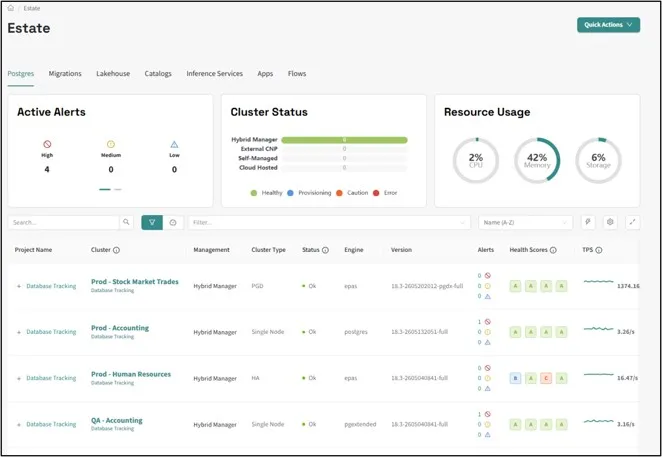
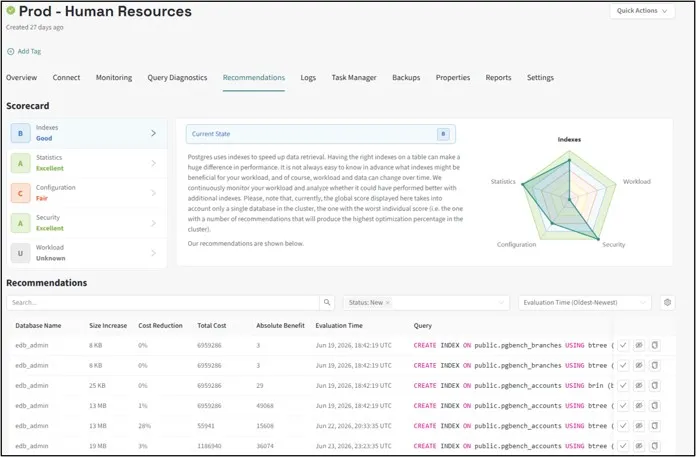
Out of the box, the system monitors four dimensions:
- Index health: whether existing indexes match actual query patterns, and whether new ones should be built
- Statistics freshness: alerting when query planner statistics have gone stale and the query planner is working with outdated information
- Configuration parameters: comparing current settings to recommended values and generating the exact ALTER statements needed to bring them into alignment
- Security parameters: flagging drift from known-good security baselines before it becomes a compliance issue
What makes this genuinely useful is the specificity of the output. If the system flags a missing index, you can review it in context, determine whether it reflects an ongoing query pattern or a one-time anomaly like a scheduled overnight index rebuild that silently failed, and decide whether to apply it. That kind of early warning, surfaced automatically, is what turns a reactive DBA practice into a proactive one.
For teams without dedicated DBAs, this closes a real expertise gap. For teams that have them, the system eliminates the time between spotting an issue and knowing how to resolve it.
AI-Driven Query and Schema Optimization
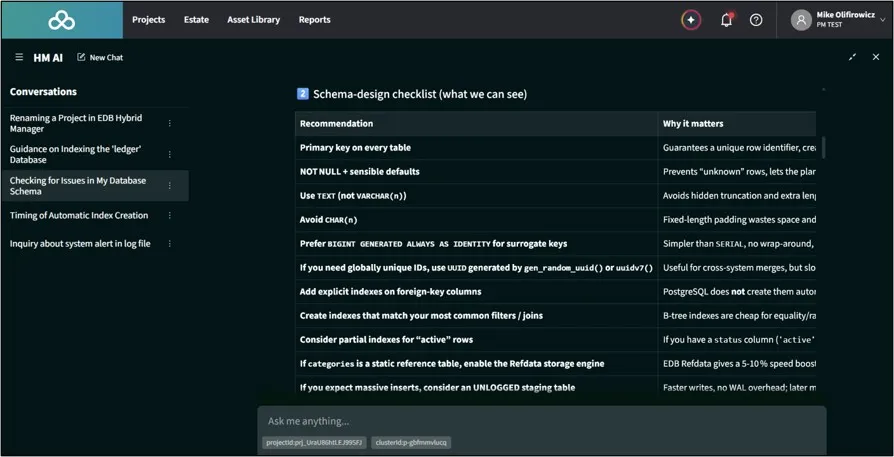
Beyond system-level health, Hybrid Manager includes an embedded AI interface that lets you interact with your database's query history in natural language. The workflow looks like this: you type a prompt such as "I'm looking for queries that ran against the ledger database in the public schema, can you recommend some changes?" The system then:
- Introspects the current schema structure
- Reviews the historical query log for that database and schema
- Identifies patterns: slow queries, missing indexes, inefficient joins, suboptimal data types
- Returns concrete optimization recommendations
This is a meaningful shift from traditional query analysis tools, which require you to know what question to ask. A DBA who already suspects a problem can confirm it. A developer who has no idea where to start can get oriented fast. Here, you describe a context and the system surfaces what matters, meeting both audiences where they are. For teams without dedicated DBAs, this capability alone can close a significant expertise gap.
Autonomous Resource Scaling with Approval Workflows
The most operationally significant capability is automated resource management: Hybrid Manager can dynamically add CPU, memory, or disk to a running cluster, autonomously or with human approval, depending on your configuration.
Available Automations
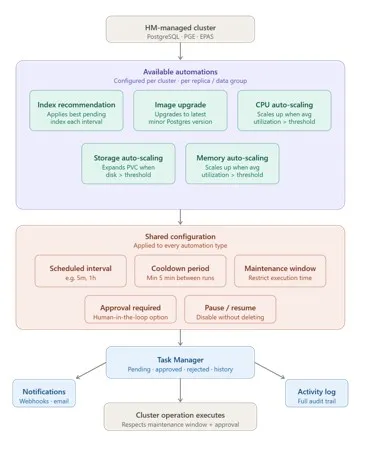
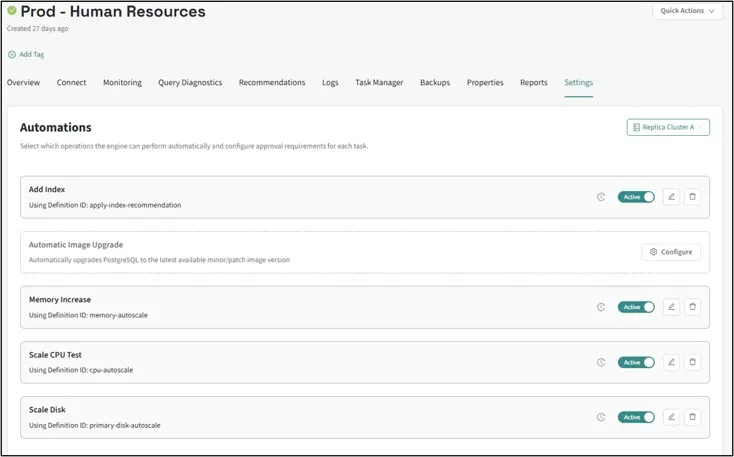
Hybrid Manager's automated operations framework currently supports five automation types:
- Database Storage Auto-Scaling: Expands cluster storage when utilization exceeds a threshold, preventing disk-full outages
- CPU Auto-Scaling: Scales CPU cores when average utilization exceeds a defined threshold
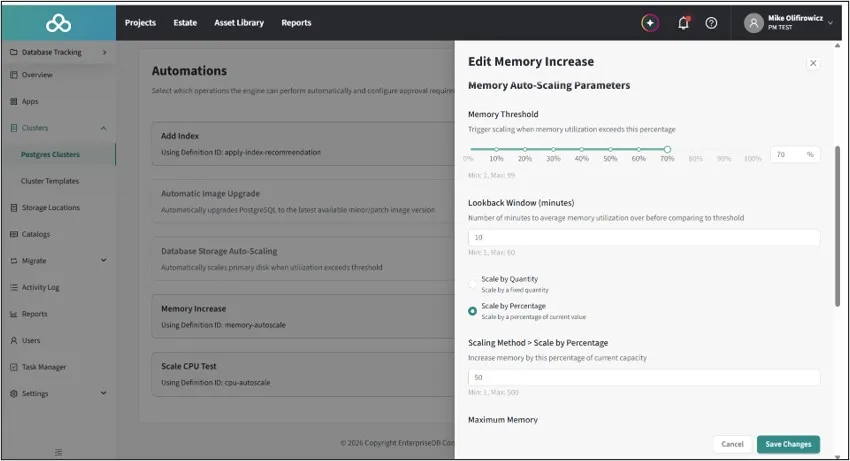
- Memory Auto-Scaling: Scales memory when average utilization exceeds a defined threshold
- Apply Index Recommendation: Automatically applies the highest-value pending index recommendation, weighted by total time-saved relative to write performance impact
- Automatic Image Upgrade: Upgrades PostgreSQL to the latest available minor/patch image version
Each automation is configured per cluster (or per data group for multi-location PGD clusters) from the Settings → Automations tab, and can only be configured after the cluster has been provisioned.
Shared Configuration Parameters
All automation types share a common set of configuration fields:
| Field | Description |
| Interval | How often HM evaluates the condition (e.g., 5m, 1h) |
| Cooldown Period | Minimum time between successive scaling events, which prevents rapid back-to-back actions during spikes. AWS deployments should set this to at least 6h due to platform restrictions on disk expansion frequency. |
| Paused | Temporarily disable the automation without deleting its configuration |
| Maintenance Window | Optionally restrict execution to a defined time window |
| Approval Settings | Configure human-in-the-loop review (see below) |
Approval Modes: Autonomy as a Dial
The key design insight in Hybrid Manager's automation framework is that autonomy is a dial, not a switch. Three distinct postures let teams calibrate control to their risk tolerance:
Approval Not Required: the agent acts immediately when the threshold is crossed. The cluster is taken briefly offline, the resource is updated, and it comes back up with the new allocation. Fast and fully autonomous; best suited for non-production environments or teams that have validated their trigger thresholds.
Approval Required: the automation creates a pending task in Task Manager and waits. An operator reviews the context and approves or declines. You can configure:
- An Approval Timeout: how long to wait before the task expires (e.g., 24h, 72h)
- A Require Reason flag: forcing approvers to provide a written justification
- An Approval Description: a message shown to approvers explaining the purpose of the request
Maintenance Window: the action is queued and executes only within a pre-configured maintenance window, defined at the project level. This is ideal for changes you're comfortable making but want to defer until off-peak hours. Maintenance windows and approval requirements can also be combined: in that case, the task must be approved and fall within an open window before it executes.
Hybrid Manager's RBAC system ensures that only users with the appropriate permissions in the target database can approve tasks, so the approval chain maps to your existing access controls.
Full Audit Trail via Task Manager
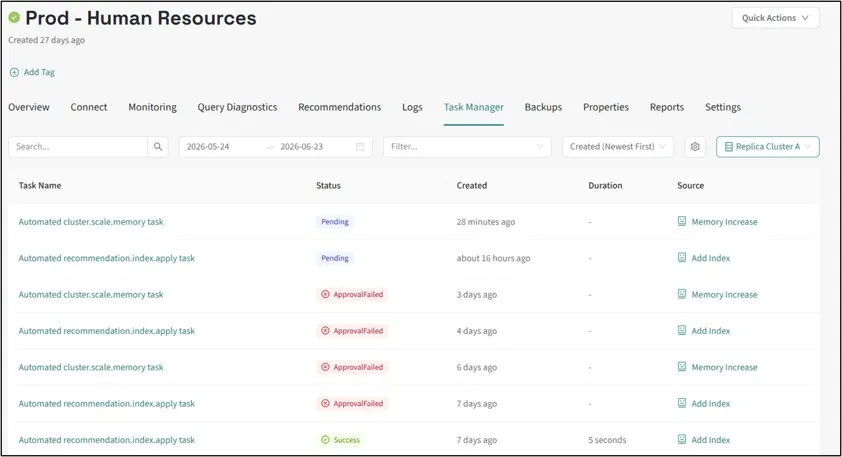
All automation activity, including scheduled evaluations, triggered tasks, pending approvals, completions, and failures, is tracked in Task Manager, giving teams a centralized audit trail of every action taken. Task events also appear in the Activity Log and can trigger notifications to external systems via project-level webhooks (email, PagerDuty, or custom webhook endpoints).
Seeing It in Action
In a live demo, two pending tasks (one for CPU scaling, one for memory scaling) were approved simultaneously through Task Manager. After approval:
- Both tasks moved from pending to running
- The cluster was briefly taken offline during the resource updates
- The cluster came back online with expanded resources
A quick inspection of the cluster's replica configuration afterward confirmed the result: a cluster that started with 1 CPU and 1 GB of memory had scaled to 2 CPUs and 1.7 GB, applied live, without any manual infrastructure intervention.
What to Know Before You Enable Full Automation
One important caveat: when the system adds CPU or memory today, the pod restarts. Batch jobs or in-flight queries at that moment will fail, which could introduce the very instability you were trying to prevent. Until you've validated how automations behave in your specific environment, configure either a Maintenance Window or Approval Required workflow first. These settings give you the benefits of intelligent automation while ensuring resource changes happen on your terms, at a time and under conditions you control.
From Reactive to Anticipatory
What makes this genuinely agentic is that the system doesn't wait for alerts. The system evaluates conditions on a defined interval, acts (or prompts you to act) before problems escalate, and leaves a full audit trail of every decision. Every automated action is traceable through Task Manager and the Activity Log, so the system's behavior is never a black box, and every change can be reviewed, questioned, or rolled into your existing change management process.
Teams that want full autonomy get it. Teams that need human oversight (for compliance, cost control, or change management) preserve it without giving up the monitoring and recommendation layer. The result is an operational model that scales with your organization's risk tolerance, not against it.
For organizations scaling database infrastructure faster than they can scale DBA headcount, this isn't a nice-to-have. This is the architecture that production Postgres at scale is being built on.
Getting Started
The Agentic Database is available in the EDB Postgres AI Hybrid Manager Innovation Release. To configure automations:
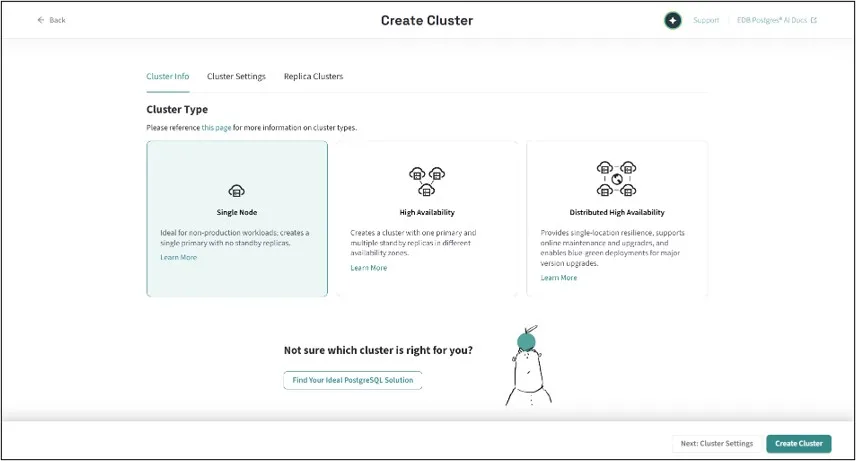
1. Provision your cluster in Hybrid Manager
2. Navigate to Settings → Automations on the target cluster
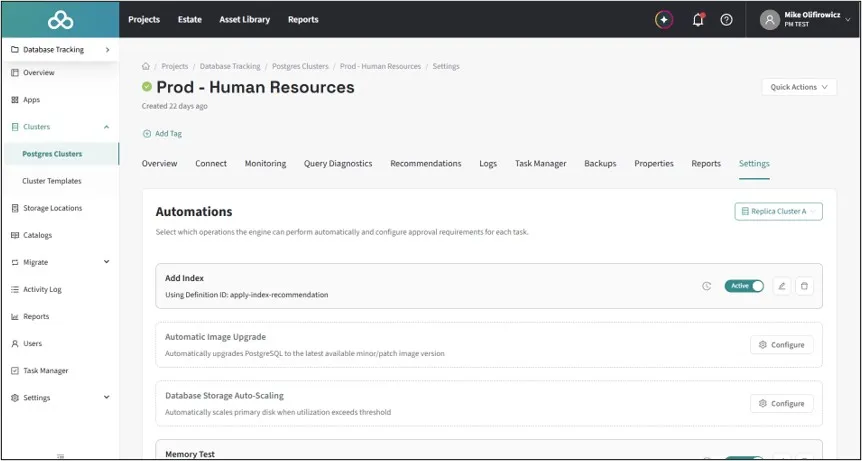
3. Select Configure next to the automation you want to enable
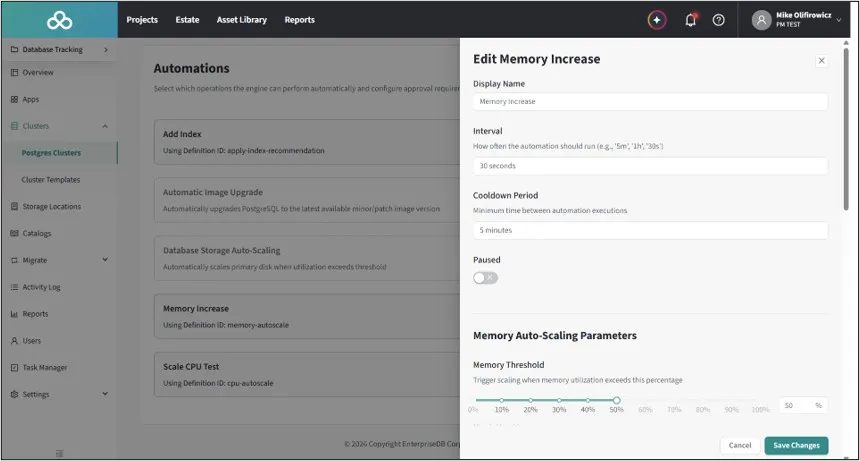
4. Set your interval, cooldown, scaling parameters, and approval mode
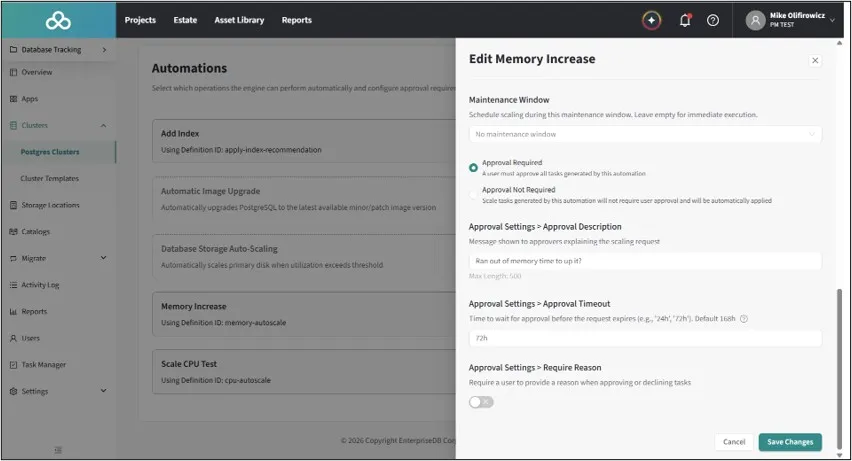
5. Optionally attach a maintenance window
6. Select Create Automation
Full documentation is available here.